LinkShare rotating banner

Sunday, April 5, 2009

Multiple Windows Installation

When the Vista Loader — also known as SoftMod or OEM BIOS emulation — is installed in a system with multiple Windows installations, Windows probably won't boot except the one in the first NTFS partition because the Grub4Dos code in the grldr file installed by the Vista Loader by default boots the first NTFS partition. In this case, you should uninstall Vista Loader from every Windows partition and then reinstall Vista Loader into a separate FAT logical partition. GRUB4DOS or pure GRUB will be used to load OEM BIOS emulation code into memory and then execute instructions in the menu.lst file to boot Windows in NTFS primary partitions.


To use multiple Windows installation, Grub4Dos and Vista Loader should be used together. This duo can be installed on a floppy or a bootable USB flash. The following is the contents of a menu.lst file used with Vista Loader.


timeout 0
default 0
fallback 1

title Vista Loader
map --mem (hd0,0)/vstaldr.img (fd0)
map --hook
chainloader (fd0)+1
rootverify (fd0)

title Windows Vista
find --set-root /bootmgr
chainloader /bootmgr


Related Posts


Saturday, April 4, 2009

Fixing a Vista Boot Problem

Error: Press Ctrl+Alt+Del to restart


I restored a partimage backup of Windows Vista. The backup was originally made from the partition /dev/sda2, but I deleted /dev/sda1 and created a new partition at /dev/sda1 with the same size as the backed-up partition. Then I restored the backup on /dev/sda1.


Upon reboot, Windows Vista couldn't start. Instead I received an error:


A disk error occurred.

Press Ctrl+Alt+Del to restart.

After many attempts, I finally fixed the problem. Here I show how I did it:


  1. Put your Vista installation DVD into your DVD drive and restart your computer. When you see the message "Press a key to boot from DVD", press any key.
  2. When the Install Windows screen appears, click Repair your computer.
  3. You may see Vista automatically trying to detect a boot problem and fix it. When a boot problem is detected, you'll get a dialog with a choice to fix the problem or ignore it. Just cancel and close the dialog.
  4. You'll be shown a window with many repair options. Open a command prompt.
  5. Type the following commands. It is assumed that Windows is installed in C: Replace C: with the correct letter if it's different:
    chkdsk C: /f
    C:
    bootrec /FixMBR
    bootrec /FixBoot
    bootrec /ScanOs
    attrib -r -s -h c:\boot\bcd
    del c:\boot\bcd
    bootrec /rebuildbcd

  6. Restart your computer and see if Vista can start.


Error: Winload.exe is missing or corrupt


Windows failed to start. A recent hardware or software change might be the cause. To fix the problem:
1. Install your WIndows installation disk and reboot.
2. Choose your language settings, click Next
3. Choose "Repair your computer"

File: \Windows\system32\winload.exe
Status: 0xc0000225
Info: The selected entry could not be loaded because the application is missing or corrupted

This problem occurs when the UUID of the NTFS partition is changed after resizing or moving the Windows partition with GParted or Acronis Disk Director. This problem can be easily fixed if you have a Windows install DVD. Put the Windows install DVD in your CD-ROM and Reboot your computer. Select “Repair your computer” and cancel Automatic Repair. Open a Command Prompt and type the following commands:


C:
bcdedit /enum /store C:\Boot\BCD
bcdedit /store C:\Boot\BCD /set {bootmgr} device partition=C:
bcdedit /store C:\Boot\BCD /set {default} device partition=C:
bcdedit /store C:\Boot\BCD /set {default} osdevice partition=C:

Sample xorg.conf for a Minimal System

The following is the contents of my xorg.conf file of a minimal Linux system that I use as a base for a Live CD. It makes use of either VESA standard server or framebuffer server.


Section "Files"
FontPath "/usr/local/share/fonts"
FontPath "/usr/share/fonts/X11/Type1"
FontPath "/usr/share/fonts/truetype/latex-xft-fonts"
FontPath "/usr/share/fonts/truetype/ttf-dejavu"
FontPath "/usr/share/fonts/truetype/ttf-thai-arundina"
FontPath "/opt/jre1.6.0_06/lib/fonts"
FontPath "/opt/jre1.6.0_06/lib/oblique-fonts"
EndSection

Section "ServerFlags"
Option "DontVTSwitch"
Option "DontZap"
Option "DisableVidModeExtension"
Option "AllowMouseOpenFail"
Option "UseDefaultFontPath" "No"
EndSection

Section "Module"
Load "dbe"
Load "ddc"
Load "dri"
Load "extmod"
Load "freetype"
Load "glx"
Load "int10"
Load "record"
Load "vbe"
EndSection

Section "InputDevice"
Identifier "Generic Keyboard"
Driver "kbd"
Option "XkbModel" "kr106"
Option "XkbLayout" "kr,us,ru,tr"
Option "XkbVariant" ",intl,winkeys,f"
Option "XkbOptions" "grp:sclk_toggle,grp_led:scroll"
Option "CoreKeyboard"
EndSection

Section "InputDevice"
Identifier "Generic Mouse"
Driver "mouse"
Option "Device" "/dev/input/mice"
Option "Protocol" "ImPS/2"
Option "Emulate3Buttons"
Option "CorePointer"
EndSection

Section "InputDevice"
Identifier "Serial Mouse"
Driver "mouse"
Option "Device" "/dev/tts/0"
Option "Protocol" "IntelliMouse"
EndSection

Section "Device"
Identifier "Framebuffer"
Driver "fbdev"
Option "fbdev" "/dev/fb/0"
EndSection

Section "Device"
Identifier "VESA Standard"
Driver "vesa"
EndSection

Section "Monitor"
Identifier "Generic Monitor"
Option "DPMS"
EndSection

Section "Screen"
Identifier "Screen.0"
Device "VESA Standard"
Monitor "Generic Monitor"
DefaultDepth 16
SubSection "Display"
Depth 15
Modes "800x600" "640x480"
EndSubSection
SubSection "Display"
Depth 16
Modes "1024x768" "800x600" "640x480"
EndSubSection
EndSection

Section "Screen"
Identifier "Screen.1"
Device "Framebuffer"
Monitor "Generic Monitor"
EndSection

Section "ServerLayout"
Identifier "Default Layout"
Screen "Screen.1"
EndSection

Thursday, April 2, 2009

Tweaking Windows Vista for Slow PC

Is Windows Vista only for fast and powerful computers? Not really. Technically, Vista can run on old computers with a CPU as slow as 800MHz. But Vista runs sluggish on old computers. For those old and slow computers, there are some ways to improve the speed of Vista, as explained below.


Stop unnecessary programs from running or starting.


Don't use the Windows Sidebar. This program is unnecessary and graphics-intensive program that slows your computer down. You can easily disable it from starting.


Disable UAC


Disabling UAC may dramatically speed up Windows Vista.


Disable Windows Theme


If you don't need fancy Windows themes, you can change your theme to a plain one or disable the Themes service altogether.

Monday, March 30, 2009

Test Driving Taiwanese Windows Vista (Chinese Traditional)

Taiwan is being overshadowed by the monstrously growing mainland China today. However, its cultural heritage is as rich as mainland China where it originated. The authenticity of the traditional Chinese scripts used in Taiwan and Singapore should not be overlooked in favor of the simplified Chinese used in the mainland China. If you are studying Chinese or do business with Taiwan or the mainland China, you may sometimes come across Chinese versions of Windows Vista.


I installed Taiwanese Windows Vista to see what it's like. Since I have almost no knowledge of Chinese, it was like guesswork most of the time. Often I had to rely on my experience with English Windows Vista. But as times went on, I learned the meaning of some Chinese characters naturally. It is such an enlightening expererience to use Taiwanese Windows Vista.


Windows Vista TW Traditional Chinese Welcome Center

Related Posts


Sunday, March 29, 2009

Installing Korean Windows Vista

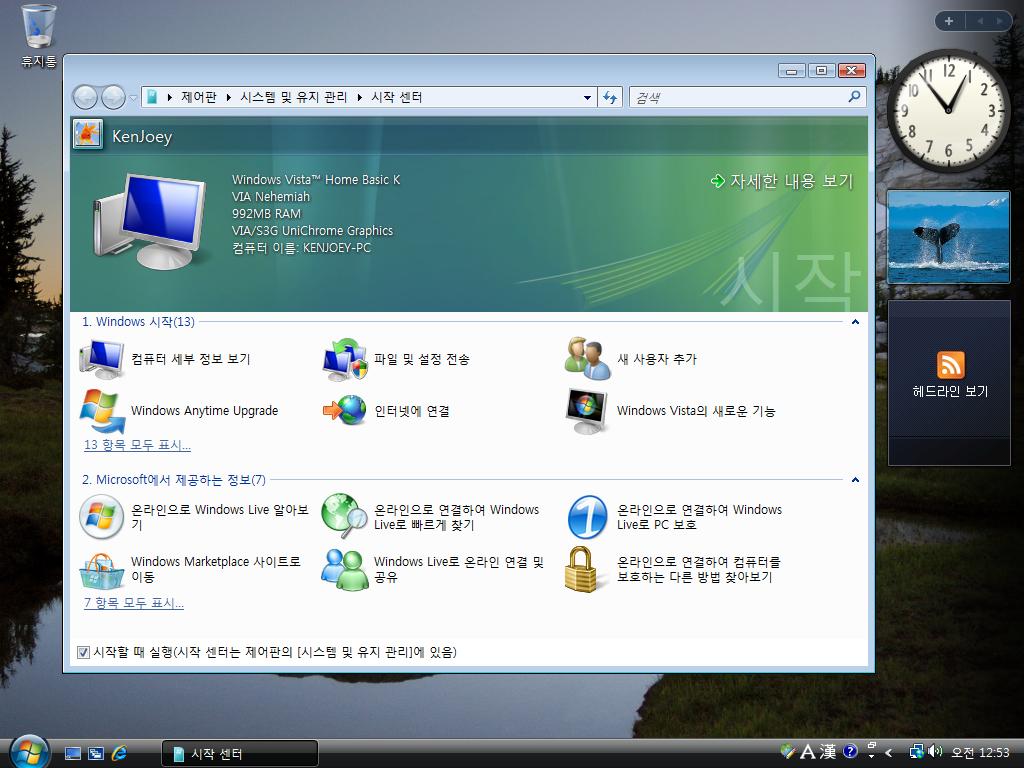
Due to the Korean cultural expansion and popular k-drama, there's an increasing number of people interested in learning the Korean language and Korean culture. If you are one of those people who study Korean, you may as well try Korean Windows Vista. ISO images of Korean Windows Vista DVD are available on the P2P networks with the filename X12-59647 vista.rtm.kor.iso. Once you download and install it, it's quite adventurous and fun using the Korean version of Windows Vista.


Windows Vista Home Basic K Korean Welcome Center

Related Posts


Surface of a Sphere

Let's derive the formula for the surface of a sphere. A sphere is a revolution of a circle. Let there be a circle whose function is x2+y2=r2. Then its center is (0,0) and r is its radius.


a circle x^2+y^2=r^2

When we revolve the circle about the x-axis, we get a sphere. Since we already know the formula for the surface of a revolution, we can find the surface area of a sphere as follows:


to derive the formula for the surface area of a sphere

Saturday, March 28, 2009

Cleaning Up Windows Vista

This post will eventually be a collection of tips on cleaning up and trimming Windows Vista.


Emptying the Recycle Bin


Emptying the recycle bin is the easiest and most common way for people to clean up Windows. Even if you don't, Windows will automatically remove the oldest trash from the recycle bin when it fills up.


Deleting Temporary Files


As you use your computer, Windows and applications save temporary files in the folder dedicated for temporary storage. These temporary folders are given the variable name %TEMP% or %TMP% — in most cases, %TEMP% and %TMP% are identical. Ideally, applications are supposed to remove temporary files after they finish their jobs, but sometimes they forget to remove temporary files. Thus, once in a while, you have to remove temporary files yourself.


To remove temporary files, follow the following steps:


  1. Open the Explorer — the default file browser in Windows. You can do so by opening My Computer, My Document, My Pictures or My Music.
  2. Type in the address bar %TEMP% and press Enter.

    Go to %TEMP% folder.
  3. You'll be taken to the temporary folder, typically C:\Users\YourName\AppData\Local\Temp. Remove any temporary files and folders existing inside that folder.
  4. If %TEMP% and %TMP% are different, also do the same for %TMP% folder.


Cleaning Up VirtualStore


With strict User Access Control (UAC) in effect, Vista places user-generated files in the VirtualStore folder when a program wants to save something in the restricted area of filesystem. Type %APPDATA% in the address bar of the Windows explorer. Then, descend to Local/VirtualStore. Note that not everything there should be deleted as some of them are user settings.


Deleting Windows Updates


Windows updates are necessary to make Windows Vista secure and efficient. However, after updating Windows, some update files are left over and take extra space. The following steps delete these left-over update files.


  1. Open the Start menu, right-click Computer and select Manage.
  2. In the left pane, expand Service and Applications and select Services.
  3. In the right pane, select Windows update service and stop the serive.
  4. Open Computer in the explorer and go to C:\Windows\SoftwareDistribution
  5. Go to the DataStore folder and delete all files and folders there.
  6. Go back and change to the Download folders. Remove all files and folders there.
  7. Restart the Windows Update service.

Using GParted To Create Dual-Boot Vista Partitions

Have you ever wished to have multiple Windows installed on your computer? Having a multi-boot system has many applications, such as:


  • Set up one Windows system for your work or school, and set up another Windows system for your family and kids, all in one single computer
  • Use one Windows installation for your sensitive data, and use another installation for gaming and the Internet
  • Set up multiple Windows for different languages, for example one for English and another for Spanish
  • Try different Windows versions, one for Vista, one for XP and another for Windows ME.

In order to set up multiple installations of Windows in a single computer, you need to slice your hard drive into several partitions using a partitioning tool such as GParted. Get a GParted live CD and boot your computer with it.


Partitioning Advices


Here's what you need to know about multiple Windows installation:


  • One primary partition must be set up with Windows Vista or XP and set active. This partition will be used to boot itself and optionally other Windows partitions, primary or logical.
  • If multiple primary partitions have Windows installed, then only one of them should be active and the others should be hidden.


GParted in Action


Once you booted GParted live CD, launch GParted.


GParted first look

In most case, you'll see a Windows partion (type ntfs) as the first primary partition. If you need to resize it to make space available for the second Windows partition, you can use GParted, but I recommend you to use ntfsresize.


Now hide your existing Windows partition by right-clicking it and choosing Manage Flags.


GParted Manage Flags

Clear the boot flag and set the hidden flag. Then click Close.


GParted hide partition

Click the unallocated area and click New on the toolbar. Create new Partition dialog appears on screen. Set the size in the New Size box, create it as a Primary Partition and make it ntfs. Click Add.


GParted Create new Partition dialog

Look at the GParted window and make sure the new hard disk layout is okay. Click Apply on the toolbar.


GParted changed new layout

A confirmation dialog appears. Click Apply.
GParted Apply operations to device

If everything goes well, a dialog appears saying All operations successfully completed. Click Close.


GParted All operations successfully completed.

Right-click the newly created NTFS partition and select Manage Flags from the right-click menu. In the Manage flags window, only set the boot flag and click Close.


GParted Manage Flags

Quit GParted. Put your Windows installation DVD into your CD-ROM and reboot.

Friday, March 27, 2009

Resizing a Windows Vista partition with ntfsresize

Well, it's ironic that we need to use a Linux program to resize a Windows partition, but we don't want to spend money on buggy Windows programs. There are many tutorials on the Web that show you how to use the venerable GParted program. But in this tutorial, I'll talk about ntfsresize. Be warned that improperly following this tutorial may result in your computer totally unusable. Before proceeding, be sure to back up your computer. Once you've done that, place a Linux CD into your CD-ROM and reboot. I recommend you to try one of the following:


GParted vs ntfsresize


The problem with the user-friendly GParted is that after using it, your Vista is unbootable and you need to get the Vista installation DVD to fix it. In most cases, people don't have Windows installation DVD's because they bought PC's preinstalled with Vista. In such a case, ntfsresize is a better alternative although ntfsresize is not as intuitive as GParted. If you use ntfsresize properly, you can just reboot your PC, let Windows self-check the filesystem, and your Vista is fine after the second reboot. Anyway, both GParted and ntfsresize can wreck havoc to your PC if used improperly.


Windows Boot Manager
Windows failed to start. A recent hardware or software change might be the cause. To fix the problem:
1. Install your Windows installation disk and reboot.
2. Choose your language settings, click Next
3. Choose "Repair your computer"

If you do not have this disc, contact your system administrator or computer manufacturer for assistance.
File: \Windows\system32\winload.exe
Status: 0xc0000225
Info: The selected entry could not be loaded because the application is missing or corrupted

The error above commonly appears when you manipulate you partitions with GParted. To fix the error, read this post: Fixing a Vista Boot Problem.


Why you can't just reboot after using GParted


Every NTFS has a unique serial number (UUID) associated with it. When you resize or move an NTFS filesystem, it is possible that the UUID of the NTFS partition changes. To fix a problem caused by the UUID change, you have to correct the UUID in C:\Boot\BCD.


Displaying the Partition Table


Once you're in Linux, open a console or xterm and type the following command to display the partition table. You may have to replace /dev/sda with /dev/hda or /dev/hdc depending on your hardware configuraton. In general, IDE/ATA hard drives have /dev/hd* names and SATA hard drives have /dev/sd* names.


fdisk -l -u /dev/sda

fdisk -l -u /dev/sda

The fdisk -l command shows you which partition has the Windows. In this example, Windows is in the partition /dev/sda1 which starts at sector 2,048 and ends at sector 78,151,679. Since 1 sector is 512 bytes, /dev/sda1 is 39,074,816 kilobytes (about 40 GB).


Shrinking a Windows Partition


Roughly speaking, to shrink a Windows partition, first use ntfsresize to resize the Windows filesystem, then use fdisk to delete the Windows partition and create a new one that fits the smaller NTFS. Type the following command to find out how small you can resize your partition to:


ntfsresize --info /dev/sda1

ntfsresize --info /dev/sda1

The output above says that the NTFS partition can be resized as small as 16,728 MB. For example, to resize from 40GB to 20GB, type the following command.


ntfsresize --size 20G /dev/sda1

ntfsresize --size 20GB /dev/sda1

A question appears asking your confirmation to proceed. If you type y, ntfsresize will resize your Windows filesystem showing the progress. When ntfsresize finishes resizing the NTFS, the screen looks like this.


ntfsresize completed

Type fdisk -u /dev/sda to change your partition table to accommodate the resized Windows filesystem.


fdisk -u /dev/sda

First, delete the existing Windows partition by typing d and then the partition number 1. Now type n to create a new partition, then type p to set it primary, then type 1 to make it the first partition. When you are asked for the starting sector, type the same starting sector as the old deleted partition, in this case 2048. When you're asked for the ending sector, give the approriate number that's slightly larger than the filesystem. Here are my calculations:


20,000,000,000/512=39,062,500

39,062,500/255/63=2,431.528

2,432*255*63=39,070,080

39,070,080-1=39,070,079

Since I resized my Windows partition to 20GB, my new Windows filesystem is 39,062,500 sectors and 2,431.53 cylinders — my hard disk is 255 heads * 63 sectors/track * 9729 cylinders. Round the number up to 2,432 cylinders and convert it to 39,070,080 sectors. Finally, subtract 1 from it and I got 39,070,079. Give it as the ending sector.


create a new NTFS

Type t, 1, 7 to change the type of the new first partition as NTFS. Type a to make it active. Type p to display the changed partition table to make sure it's correct. Finally, type w to write the new partition table and exit fdisk.


Now, all that's left to do is reboot and see if everything works. Hopefully, you'll see a black-and-white screen for checking filesystem integrity. After that and another reboot, you'll get back to Windows. Hooray!


Enlarging a Windows Partition


Enlarging a Windows partition takes the opposite steps. First delete the Windows partition and create a larger partition beginning at the same sector as the deleted partition. Then use ntfsresize to enlarge the NTFS.


Related Posts


Setting the Background with xsetbg

This is just my 2 cents on setting the wallpaper on your X Windows desktop. There are many tools for setting the background — technically called the root window. If you use KDE or GNOME, setting up the background is automatic as it is done by the friendly GUI. However, if you are one of those people — including me — who prefer light and minimalist X-Windows environment, you'll put a command in your .xsession file to set your background.


My Lotus desktop screenshot

Here, I introduce you to a nice nifty tool called xsetbg. It belongs to a package called xloadimage. I find it attractive just because it doesn't have many dependencies. This is how I use xsetbg in my .xsession file to place my lotus wallpaper on the desktop:


/usr/bin/xsetbg -center -xzoom 115 -yzoom 128 /usr/share/pixmaps/5469_G.jpg

The nice thing about it is that it lets you zoom the width and height separately and center the image at the same time. Pratically, this feature allows you to hide unwanted edges from the screen. For example, the picture below has unnecessary edges around it.


The forgotten sanctuary in the fantasy land

The following command sets this image as the desktop wallpaper without the unwanted edges (assuming your screen is in 800x600 resolution). Change the zoom percentages as necessary for your screen resolution.


xsetbg -center -xzoom 67 -yzoom 85 Sanctuary.jpg

My Fantastic Sanctuary desktop screenshot

Wednesday, March 25, 2009

Differential of Arc Length

I was trying to derive the formula for obtaining the surface area of a sphere, but I kept making mistakes whereby I chopped the surface in dx or dy. When you calculate the arc length of a curve or the surface area of a volume, you have to chop it in lengths of the slope, not the width or the height.


To compute the length of an arc of a curve, we need to define the differential of arc length. If we zoom in on a small section of a curve, we find that the length of a curve s is the length of the slope of a right triangle whose base is dx and whose height is dy.


Figure: Differential of Arc Length

Therefore,


Figure 2: Differential of Arc Length

Surfaces of Revolution


Using the differential of arc length, we can find the area of the surface generated by rotating a curve C about the x-axis or y-axis. When a curve of function y=f(x) is rotated about the x-axis, the surface area of the generated solid can be found with the following formula:


Formula for Surface Area when rotated about x-axis

When a curve of function y=f(x) is rotated about the y-axis, the surface area of the generated solid can be found with the following formula:


Formula for Surface Area when rotated about y-axis

Tuesday, March 17, 2009

Windows ME (Millenium Edition) Still Lives

Is Windows Vista too slow for your good old computer? Is Windows XP too much for your computer to handle? But you don't want to spend a fortune to buy a new PC. Then get a copy of Windows ME and install it. Surprisingly, there are still copies of Windows ME on the 'Net. Get 'em before they disappear into obvillion!


The following keys can be used for RTM versions of Windows ME.


B6BYC-6T7C3-4PXRW-2XKWB-GYV33

FMMMC-G8GQH-BH9MT-YBRH3-CRD6T

Downloading Windows Vista ISO

Microsoft often releases samples of its flagship programs to its MSDN members. Among the software samples released to MSDN members are a series of Windows Vista editions. Some of these copies are leaked to P2P networks like BitTorrent or eDonkey. Below is a list of Windows Vista ISO images including those released to MSDN members:


LanguageFilename32-bit Links64-bit Links
Chinese Traditional
繁體中文
tw windows vista x86 dvd X12-59649.iso
Windows Vista x86 32位元系統繁體中文正式授權製造商裝機版.ISO (2,577,250,304 bytes)
1
EnglishWindows Vista All-in-One RTM build

6000.16386.061101-2205_x86Fre_Client Lrmcfre_En_DVD.iso (2,678,614,016 bytes)
1, 2
Windows Vista English Service Pack 2

6002.18005.090410-1830_x86fre_Client_en-us-FRTMCFRE_EN_DVD.iso
1
Korean
한글
Windows Vista X86 DVD X12-59647 vista.rtm.kor.iso (2,591,459,328 bytes)1


Related Posts


Saturday, February 28, 2009

Linux Tip: Retrieving Files From Unbootable Windows partitions

You are a Windows person. You've been using Windows for your daily work, school, or something else. One day, you turn on your PC, and, for whatever reason, you can't boot your Windows. You try every trick you know without success. Your last resort is to recover your precious data from your unbootable Windows partition — if your hard drive is still in good condition and accessible. You could use a Windows Vista installation CD which lets you use the unfriendly Windows repair console.


You can also use Linux to retrieve files from your troublesome Windows partition. If you don't have Linux installed in your computer, you can use a Linux Live CD that's available free from the Internet. A live CD lets you try something without installing it into your computer. Most Linux installation CD's released today are also live CD's. For example, you can try an Ubuntu CD to test-drive Linux and also access data from your broken Windows partition.


Assuming that you booted into Linux, start xterm, konsole or Gnome terminal. Mount your Windows partition with the following command so that you can access and copy files from Windows — specify your Windows partition in place of /dev/sda1:


mount -t ntfs-3g /dev/sda1 /mnt

The command above mounts your Windows partion /dev/sda1 on the directory /mnt. Now, you can change the current directory to /mnt and list its contents like this:


cd /mnt

ls

Plug in your USB flash so you can save your data on it. Then, mount your USB flash onto /media &mdash assuming your flash drive is /dev/sdb1 and the directory /media exists:


mount -t vfat /dev/sdb1 /media

Now you're ready to copy files from your broken Windows partitions to your flash drive using Linux. The following example illustrates copying files in Linux:


cd Users/Kenneth/Documents

cp project7k.doc /media

mv finance9b.xls /media

tar cf - folderX | (cd /media; tar xf -)

The first command in the example above lets you change the current folder to Users/Kenneth/Documents — that's the typical path to user data in Windows Vista. The next commands copy the file project7k.doc and move finance9b.xls and folderX to your flash drive mounted on /media.


Once you retrieve your data files from the broken Windows partition and save them on your USB flash, you can go ahead and wipe your Windows. Then, you may choose to reinstall Windows, or better yet, try and install Linux. My recommendation is Debian Linux.

Thursday, February 19, 2009

Calculus Formulas: Finding Anti-Derivatives

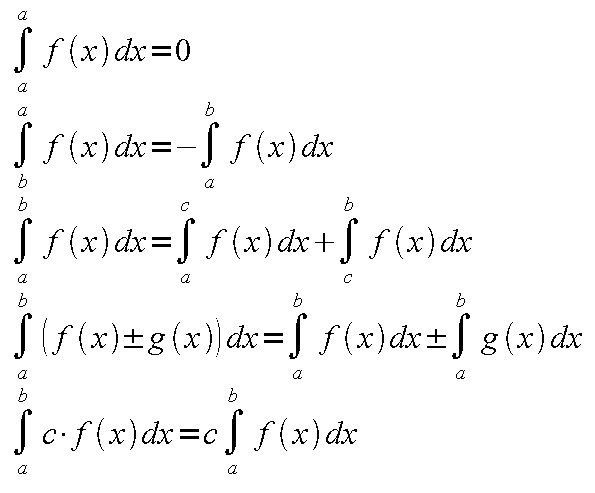
Properties of Definite Integrals


Properties of Definite Integrals

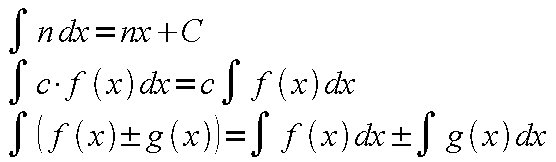
Basic Properties of Integrals


Basic Properties of Integrals

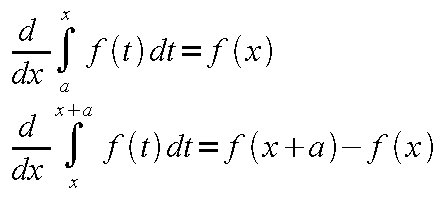
Derivatives of Definitive Integrals


Derivatives of Definitive Integrals

Table of Integrals


Table of Integrals

Calculus Formulas: Finding Derivatives

Basic Formulas of Derivatives


For any two differentiable functions f(x) and g(x):


  1. f(x)=c (c is a constant), then f'(x)=0
  2. g(x)=cf(x) (c is a constant), then g'(x)=c·f'(x)
  3. f(x)=xn (n is a rational number), then f'(x)=nxn-1
  4. y=f(x)±g(x), then y'=f'(x)±g'(x)
  5. y=f(x)·g(x) then, y'=f'(x)·g(x)+f(x)·g'(x)
  6. y=f(x)/g(x) (g(x)≠0) then, y'=(f'(x)g(x)-f(x)g'(x))/g2(x)


Derivatives of Various Functions


  1. y=ex then, y'=ex
  2. y=ax then, y'=ax·ln(a)
  3. y=ln(x) then, y'=1/x
  4. y=logax then, y'=1/(x·ln(a))
  5. y=sin(x) then, y'=cos(x)
  6. y=cos(x) then, y'=-sin(x)
  7. y=tan(x) then, y'=1/cos2(x)
  8. y=arctan(x) then, y'=1/(x2+1)
  9. y=arcsin(x) then, y'=(1-x2)-0.5


Derivative of Composite Functions


  1. y=f(u), u=g(x) then, dy/dx=dy/du · du/dx
  2. y=f(ax+b) then, y'=af'(ax+b)
  3. y=fn(x) then, y'=n·fn-1(x)·f'(x)

Saturday, February 14, 2009

Kamehameha the Great and His Epic Conquest

When Captain Cook discovered the Hawaiian Islands, young and ambitious Kamehameha first encountered white men, including Captain Cook, and witnessed the wonderful novelties of white men's civilization, such as their guns and metallic weaponry. It was since this encounter that Kamehameha awakened to the new ways of the world and began nourishing his great dream of uniting the Hawaiian Islands. Kamehameha was one of the noblemen on the Big Island of Hawaii, and a nephew of the aging ruler of Hawaii, Kalaniopuu. Upon his death, Kalaniopuu bequeathed the icon of Hawaiian war god Kukailimoku to Kamehameha, but named his son Kiwalao as his ruling heir, and also handed down a big portion of the Big Island to Kiwalao.

In the years that followed (1780's), the Big Island of Hawaii found itself in frequent feuds between Kamehameha and his allies, and Kiwalao's alliance. In 1782, Kiwalao was killed in a battle at Mokuohai by Kamehameha's ally Keeaumoku. Kiwalao's younger brother Keoua and Kiwalao's uncle Keawemauhili escaped the skirmish and remained strong amid occasional conflicts with Kamehameha.

On the leeward side of the Hawaiian archipelago, other lords ruled the other Islands. Most powerful of them was Kahekili of Maui. By 1786, Kahekili had Oahu, Maui, Molokai and Lanai under his rule. Kahekili also had a peace pact with his half-brother Kaeokulani, lord of Kauai.

Since Cook's discovery of the Hawaiian Islands, many ships from the United States, Britain and other nations came to the archipelago as a resting stop on a long journey through the immense Pacific Ocean to replenish their supplies, such as water, salt, fruit and pork. The Hawaiian natives were eager to barter with the white men to get Western goods, including various novelties and metal. Of particular interest to Hawaiian chiefs were firearms of haoles that could give advantages to the warring lords of the Islands. Soon, Hawaiians enthusiastically bought or stole guns and metals from foreign ships that stopped at Hawaiian Islands. Kamehameha, with his keen foresight, was not exception to the first Hawaiian arms race. He captured two Englishmen Isaac Davis and John Young, and had them working for him as gunners. He also acquired a small cannon from a vandalized ship Fair American and called it Lopaka.

With western firearms and English aides, Kamehameha was ready to set out his conquest. In 1790, he invaded Maui and came short of capturing Kahekili's son Kalanikupule. Failing so, he had to return to the Big Island upon hearing about war there. Keoua had killed his uncle Keawemauhili and ravaged Kamehameha's territory. Kamehameha engaged Keoua in indecisive battles before both sides withdrew. One day, Kamehameha built a ritual tower and invited Keoua for discussion. Keoua accepted Kamehameha's ominous invitation and arrived at Kamehameha's ritual site in Kawaihae. Upon setting foot on the beach from his canoe, Keoua was fatally wounded with a spear thrown by Kamehameha's lieutenant Keeaumoku. Thus, Kamehameha got rid of his last opponent on the Big Island of Hawaii, and became the Lord of Hawaii.

In 1791, Kahekili, together with his half-brother Kaeokulani, his foreign gunner Mare Amara and many warriors, sailed for Hawaii to challenge Kamehameha. This battle was the first in Hawaii that saw both sides have foreign gunners, Mare Amara with Kahekili, and Isaac Davis and John Young with Kamehameha. The battle was so fierce that it was called Kepuwahaulaula, the battle off the red-mouthed gun, but no side came out winner. Kahekili withdrew to Oahu. In the quiet years that followed, Honolulu began to transform into a port city when the Englishman William Brown discovered the usefulness of Pearl Harbor. Yet, in mid-1794, Kahekili died leaving Oahu to his son Kalanikupule and other leeward islands to his half-brother Kaeokulani.

Soon after Kahekili's death, Kalanikupule and Kaeokulani turned against each other. They fought each other on Oahu. Kaeokulani was outnumbered and outmaneuvered by Kalanikupule and by Englishman William Brown's men and muskets. In the end, Kaeokulani was killed. In January, 1795, Kalanikupule killed Brown and forced the surviving shipmates to sail the ships for Hawaii to wage a war against Kamehameha. However, Kalanikupule was soon overturned and forced overboard and ashore to Oahu. The shipmates sent a note to John Young and Isaac Davis on Hawaii, telling the plot and its outcome, and left for Canton, China.

Now that Kalanikupule was without military advantages, Kamehameha invaded and took Maui and Molokai in the early months of 1795. Next, Kamehameha took his fleet to Oahu and drove to Nuuanu valley Kalanikupule and Kaiana, once Kamehameha's ally but now his traitor. Eventually, Kalanikupule and Kaiana were cornered and put to death.

At this point, all of the Hawaiian Islands were within the grasp of Kamehameha except Kauai, which was under the rule of Kaumualii. Kamehameha made two attempts to invade Kauai, both resulting in failures. The first attempt to attack Kauai in 1796 was overturned when strong winds and waves turned back Kamehameha's fleet heading to Kauai. The second trial also failed because of the outbreak of an epidemic, possibly cholera or typhoid fever in 1804. Discouraged by two failed attempts, Kamehameha was practical enough to make a compromise with the lord of Kauai, Kaumualii. In 1810, with the help of mediation by an American trader, Nathan Winship, Kaumualii accepted Kamehameha as the supreme ruler of the whole Hawaiian archipelago. In return, Kaumualii would continue to govern Kauai as a tributary king under Kamehameha. Thus, Kamehameha finally united the Hawaiian Islands and built the first kingdom in Hawaii after almost three decades of war.

Upon uniting the islands, Kamehameha laid foundation for the Hawaiian kingdom. He appointed and sent governors to each island. The governors were chosen among his close and loyal chiefs. Kamehameha kept his rule absolute and powerful by directly relaying his commands to his governors and immediately crushing any opposition when such happened. He also established Hawaii as the lively commercial center of the Pacific. Kamehameha controlled Honolulu harbor and oversaw mercantile activities occurring in the harbor. Frequently, he intervened in deal-makings with foreign merchants who sailed to Hawaiian Islands as a stop to replenish food and water. He strictly controlled who could trade with other islands besides Oahu by sending his messengers with foreign merchants to relay his orders to his governors in other islands. However, the foundation of Hawaiian economy was still agriculture and Kamehameha understood it well. King Kamehameha set his people the good example of hard labor by planting taro himself in taro patches and by going on a fishing expedition.

In retrospect, by looking at the feats and deeds of King Kamehameha, his motives to unite the islands may have been to found a strong Hawaiian nation that could bring stability across the Hawaiian isles and strength against foreign forces. At the first encounter with Captain Cook, young Kamehameha may have realized that the world outside Hawaii was so advanced and dynamic compared to the Hawaiian isles. He must have realized that Hawaii had to change. Growing up, he had seen wars between Hawaiian lords. There had to be an end to feuds between Hawaiian people. To this end, he must have felt the need to unite the Islands. Once the Hawaiian islands were united as one kingdom, he could lay a strong foundation for the Hawaiian nation and lead the Hawaiian people for better change so that they could adapt to dynamic foreign influences and resist any foreign forces.

To unite the Hawaiian isles, Kamehameha used both old and new methods. Open-minded about new ways, not only did Kamehameha employ guns, cannons, and warships from foreign merchants, but also advices and aids of foreigners, for example, Isaac Davis, John Young, and Nathan Winship. On the other hand, Kamehameha was still a faithful supporter of old ways at heart, worshiping war god Kukailimoku, building ritual towers heiaus, and consulting soothsayers.

Kamehameha's government was an absolute monarchy in which Kamehameha presided over foreign commerce and foreign affairs of the Islands. However, each island and each district had its own governor and chiefs who governed the area on its own to an extent. He controlled trade on each island through his governors. He also kept strict Hawaiian kapu system to ensure his absolute rule.

Thursday, February 5, 2009

Speed Reading

We are living in the age of information overload. Most of us have to constantly read or process a lot of information just to keep up with the fast pace of our business or school. We need to read fast, and a lot faster. But reading fast requires a skill. There are many different techniques for speed reading. What follows is introduction to one of speed reading techniques.


Why we can't read fast


There are 3 major reasons that hinder speed reading:


  • Habitual regression

    A casual reader occasionally stops reading when he or she encounters an unknown or ambiguous word. This dramatically slows reading while reducing the efficiency of the short-term memory used for reading. Remember, the context is more important than the precise meaning. An efficient reader should quickly read through the material and look up words only before or after the reading.

  • Polysyllabic fixation

    English, like most Indo-European languages, is a polysyllabic language. That means most English words are made up of two or more syllables, for example, hospital, hippopotamus, etc. Most adult readers can recognize thousands of polysyllabic words instantly when they see the words because they recognize their shape, length, syllables and prior learning. However, poor readers tend to read words by each syllable, thus resulting in slow reading. On the other hand, speed readers pass over the words very quickly, taking in all the rest of the stuff with brain-eye coordination and memory.

  • Subvocalization

    Subvocalization often occurs simultaneously with polysyllabic fixation. Most readers speak while reading, either in their mouth, in their throat, or in their mind. This is a bad habit for people who need to read a lot of material.


Organization Patterns: Parts-to-Whole vs Whole-to-Parts


Efficient readers can apply different reading skills to different materials, be it fiction, non-fiction, magazine or newspaper. Most reading materials can be put into two categories: fiction and non-fiction. They have two different organizational patterns, for example, parts-to-whole or whole-to-parts.

Fictional works have the parts-to-whole pattern. When you read something fictional, you don't know until the very end of the story what it is all about. When you read a fiction, you need to understand the parts and put the parts together so as to understand the whole.


Nonfictional materials like textbooks have the whole-to-parts pattern. A typical textbook begins with an introduction of what you're going to read or learn, then the actual contents divided into sections, and finishes with a summary or conclusion. Thus, the organization of informational books leads you from the whole to the parts. You get the big picture and then its components.


Preview before Reading


A good reader should preview a reading material and select an appropriate reading strategy according to the organizational pattern of the material. It is always important to preview the reading material before you actually read it. Some quick preview methods are as follows:


  • skim the first and last few pages
  • skim the first 5 pages, several places in the middle and the
    last 5 pages
  • skim the entire work
  • skim the beginning of each chapter or each subsection


Speed Reading Procedure


The following steps are recommended for improved comprehension, speed and retention:


  1. Survey

    Reader looks at covers and title, reads the preface and introductions, checks out if there is a glossary, definitions, pictures, etc.
  2. Preview

    Reader pays special attention to chapter titles and section titles, reads the introductions and conclusions of chapters, time permitting the first sentence of every paragraph.
  3. Comprehensive Reading

    Select the appropriate reading strategy — what can be skipped, read more carefully, etc. Mark in the margins those places to return to for an additional reading once the first reading is done. There should be NO highlighting or underlining in the first read-through. A simple check/dot in the margins is all that should be done at this point. And the reader SHOULD NOT STOP and employ that BAD HABIT: habitual regression!
  4. Review

    This is to check what was marked in the margin, skim and review the material, recall something, find answers, etc. Some quick review methods follow:

    • skim the entire work, slowing on the marked parts
    • skim from marked part to marked part
    • reread difficult parts only
    • scan only for answers to questions
    • review as many times as you need


Some skills that help Speed Reading


Good vocabulary and grammar skills are essential to reading, of course. Also, prior knowledge helps reading comprehension. Prior knowledge may refer to one's experiences or basic knowledge required for the current readings.


Good Reading Strategies


  • The reader takes chances — risks errors with language
  • The reader reads to get meaning NOT to identify letters or words
  • The reader guesses from context at unfamiliar words or SKIPS them and
    deals with them later at an appropriate time given the reading
  • The reader reads as though he/she expects the text to make
    sense — Expecting meaning, predicting meaning, making guesses, taking
    chances. Pushing ahead confidently are strategies that are critical for
    identifying meaning early on — the brain must relate incoming information
    to already stored information.
  • The reader samples the text as economically as
    possible (especially if a good preview took place) and uses the skills of
    peripheral vision to assist.


Books about Speed Reading


I found some books that teach how to read quickly from P2P networks. The following books can be downloaded using lphant.


  1. A Course in Light Speed Reading, Joseph Bennette

  2. The Evelyn Wood Seven-Day Speed Reading and Learning Program
  3. The Photo Reading Whole Mind System, Paul R. Scheele
  4. THE ALPHA-NETICS RAPID READING PROGRAM, Owen D. Skousen
  5. THE SPEED READING WORKBOOK
  6. The Speed Reading Course, Shepherd & Unsworth-Mitchell
  7. THE SPEED READING WORKBOOK

  8. Teach Yourself Speed Reading

Monday, January 26, 2009

Installing MinGW on Windows

MinGW is a free software development system for Windows. Not only is MinGW useful for porting Linux software to Windows, but you can also use MinGW to write native Windows programs. The following is an excerpt from the MinGW web site:


MinGW: A collection of freely available and freely distributable Windows specific header files and import libraries, augmenting the GNU Compiler Collection (GCC) and its associated tools (GNU binutils). MinGW provides a complete Open Source programming tool set which is suitable for the development of native Windows programs that do not depend on any 3rd-party C runtime DLLs.

Now, let's install MinGW. Note that MinGW doesn't run smoothly on Windows Vista because of weird filesystem restrictions. The workaround is:


  • to install MinGW in your home folder (C:\Users\username) or a public folder (somewhere in C:\Users\Public, for example, C:\Users\Public\Desktop)
  • to run MSYS (rxvt) as administrator (Right-click and select Run as administrator)
  • to install MinGW on FAT filesystem,
  • to work in the safe mode, or
  • to use MinGW Portable which is said to be working well.


To Set up the Latest MinGW


To have a functional MinGW installation, just download and run the latest MinGW installer.


To Set up GCC toolchain 3.4.5


To install the outdated GCC toolchain 3.4.5, download the following installers and run them in the order:


After Installation


After successfully installing MSYS, check the file /etc/fstab inside the MSYS folder. Mine looks like:


C:/MinGW /mingw
C:/MinGW /usr/local


You can try MSYS by double-clicking the MSYS icon on the desktop. This will bring up a console window where you can type in some UNIX commands. For example, the following command will display the version of installed GCC compiler:


$ gcc --version
gcc.exe (GCC) 3.4.5 (mingw-vista special r3)
Copyright (C) 2004 Free Software Foundation, Inc.
This is free software; see the source for copying conditions. There is NO
warranty; not even for MERCHANTABILITY or FITNESS FOR A PARTICULAR PURPOSE.


The environment variable HOME can be used to set the user's working directory. If your username has a space or foreign character, it may confuse MinGW and hinder the compile process. In Windows Vista and Windows 7, access restriction is imposed outside C:\Users. In such cases, set $HOME to some other location. For example, set the HOME variable like this:


Don't forget to create ~/.profile. This file can be used to set environment variables, such as CC, CFLAGS, CXXFLAGS, CPPFLAGS and LDFLAGS. These environment variables are used to customize the compiler settings. The following is my .profile contents:


CC=/mingw/bin/gcc.exe
CFLAGS='-march=pentium2 -mtune=i586 -mthreads -mms-bitfields -O2'
CXXFLAGS='-march=pentium2 -mtune=i586 -mthreads -mms-bitfields -O2'
LDFLAGS='-Wl,--enable-auto-image-base,--enable-auto-import,--enable-runtime-pseudo-reloc'
PKG_CONFIG_PATH=/mingw/lib/pkgconfig
TERM=cygwin
export CC CFLAGS CXXFLAGS LDFLAGS PKG_CONFIG_PATH TERM


Testing GCC with simple codes


Let's compile a very simple C program. Using a text editor, such as Notepad, create a text file called test.c:


#include <stdio.h>

int main(void)
{
printf("Greetings, ladies and gentlemen.\n");
return 0;
}


The following command will produce an executable code.


gcc -o test.exe test.c


Now, let's try a very simple C++ code:


#include <iostream>
using namespace std;

int main()
{
cout << "Hello, boys and girls.\n";
return 0;
}


To build it, type:


g++ -o test.exe test.cpp


Additonal Tools to Install


You can optionally install other tools from the MinGW download site, such as mingw-utils and bison. mingw-utils provides some useful tools, including dos2unix, a2dll, pexports and reimp. I find dos2unix particularly useful as it converts DOS-style line endings (CR+LF) to UNIX-style (LF) in text files. mingw-utils should be extracted into the MinGW folder and bison should be extracted into the MSYS folder.


Some tools are commonly used in the Linux development environment, such as pkg-config and msgfmt. I've compiled static versions of these programs in order to ease compiling processes. Download them from the links below and place them in /mingw/bin.


Integrated Development Environments for MinGW


If you prefer to use a convenient IDE to the command line, you have several choices:


Related Posts


Sunday, January 11, 2009

Installing Free Korean Fonts in Windows

Are you looking for free, good Korean fonts? You've come to the right place. Here I show you how to install Un fonts designed by a free Korean fonts project.


First, download the fonts from one of the links here. You may optionally choose to download additional fonts here.


Extract the fonts from the Debian package(s) with PeaZip or TugZip or any other tool.


Take the necessary steps to install the Un Korean truetype fonts in Windows.

부모 자녀 관계와 아동 행동에 대한 애착의 중요성

Kazakh mother and baby

자녀와 보호자 사이의 따뜻한 상호 반응적 관계를 발전시키는 일은 그 자체가 목적으로서 자녀의 심리 계발에 중요하다고 여긴다. 자녀와 보호자 관계 연구의 중요한 측면은 자녀의 애착 안전성이다. 애착설에 관한 여러 의문점을 다루고자 많은 모자 표본 집단을 대상으로 다양한 실험이 행해졌다. 몇몇 실험은 조화적 감정 대화(Oppenheim, Koren-Karie, & Sagi-Schwartz, 2007)와 아동 사회 행동(Burgess, Marshall, Rubin, & Fox, 2003)에 대한 조기 아동 애착의 관계를 밝히는 장기적 실험 해법을 택하였다. 다른 실험들은 이혼 가정과 완전 가정처럼 서로 다른 집단에 속한 어린이들의 애착 안정성과 성격을 연구하는 동시적 실험 해법을 택하였다(Nair and Murray, 2005). Berlin과 Cassidy (2001) 같은 몇 연구자들은 성인 애착설을 연구하고 가족 관계 문제를 다루는 심리치료의 응용에 그 용도를 제시한다. 이들 연구에 대한 간결한 재검토와 분석이 아래 따른다.

12개월 유아의 애착성과 4.5세 및 7.5세 때 모친과 다양한 감정적 주제로 얘기하는 대화 능력 사이의 관계를 조사하는 장기적 실험이 행해졌다(Oppenheim, Koren-Karie, & Sagi-Schwartz, 2007). 이 실험에서 안전 애착성 아동, 불안전 모호 애착성 아동, 불안전 혼란 애착성 아동 등을 포함한 다양한 표본 집단에 속한 각 쌍의 어머니와 아이를 대상으로 두 가지 검사가 행해졌다. 두 검사 중 하나는 자서전적 감정 사건 대화(Autobiographical Emotional Event Dialog)로서 각 쌍의 어머니와 아이는 다음 네 가지 감정을 유발하는 과거 사건에 대해 얘기했다: 행복, 슬픔, 분노 및 두려움. 표본 집단에 행한 또 다른 검사는 이별 재회 공동 서술(Separation-Reunion Narrative Co-Construction)로서 각 쌍의 모자가 아이의 과거에 경험한 부모와의 이별과 재회에 대하여 얘기했다.

이 실험을 확률적으로 분석한 결과 유아 애착성이 조화적 감정 대화의 중요한 예보 지수임을 알아냈다(Oppenheim, Koren-Karie, & Sagi-Schwartz, 2007). 유아기에 안전하게 애착된 어린이들은 소년기 내내 안정된 감정 대화를 조리 있게 구성하고 또한 부정적 감정을 수반하는 대화를 긍정적으로 마무리하는 능력을 보여주기 마련이다. 또한 이 실험은 안전 애착성의 어린이들이 불안전 애착성의 아이들보다 더 높은 단어 시험 점수를 받고 또 유창하고 균형 잡힌 대화를 전달함을 밝혀냈다.

이 연구(Oppenheim, et al, 2007)는 유아기에 보호자로부터 그들의 요구에 대한 신속 적절한 반응을 지속적으로 받은 안전 애착성의 어린이들이 보호자를 안전한 기지로서 믿고 인식하며 자유로이 감정의 세계를 탐험한다는 것을 제시한다. 대조적으로, 불안전 애착성의 어린이들은 감정 표현과 부정적 감정 해소에 흔한 어려움을 갖는다.

또 다른 장기적 연구는 14개월시 아동 유착과 24개월시 행동 억제 및 4살 때 낯선 동무와의 사회 행동 등 사이의 관계를 밝히기 위해 행해졌다(Burgess, Marshall, Rubin, & Fox, 2003). 행동 억제의 측정은 어린이를 낯선 놀이방에 데려간 다음 차례대로 새로운 노리개와 낯선 사람, 그리고 부푼 터널(그 속으로 아이가 기어가도록 격려함), 그리고 광대를 마주치게 하고 관찰하여 얻었다.

불안전 기피 애착성의 어린이들은 비억제 행동을 갖는 경향이 있다(Burgess, et al, 2003). 행동이 비억제적인 어린이들은 새로운 것에 두려움을 잘 나타내지 않고 낯선 동무에 거리낌 없이 접근한다. 그들의 성질이 안정적일 때 그들은 외향적이고 잘 나가고 사교적인 사람으로 성장하는 경우가 많다. 그러나, 그들의 성질이 비통제적으로 방치될 경우, 유아시 기피 유착성의 비억제적 어린이들은 제어할 수 없는 상황에 대해 좌절감, 분노, 또는 급기야 공격성을 표출하는 경향이 있다.

연구 표본의 부모들이 작성한 콜로라도 아동 성질 시험과 아동 행동 점검표를 확률 분석(ANOVA)하니 기피 유착성 아이들이 더 높은 공격성 점수를 받았고 억제성이 낮은 아이들이 높은 활동 점수와 낮은 탈퇴성 점수를 받았다(Burgess, Marshall, Rubin, & Fox, 2003).

대조적으로, 안전 또는 모호 유착성 어린이들은 낯선 것을 마주쳤을 때 억제된 행동을 보이는 경향이 있다(Burgess, et al, 2003). 낯선 상황에서 억제된 행동의 어린이들은 낯선 동무 사이에서 삼가는 행동을 보인다.

한편, Nair와 Murray(2005)는 유치원 아동의 애착 안전성에 권위적 양육 방식이 중요한 영향을 미친다는 것을 밝혀냈다. 권위적 양육 방식은 어린이들의 애착 안전성을 키우는 온화하고 감응 협조적인 양육 방식과 유사하다고 볼 수 있다.

Nair와 Murray(2005)는 완전 가정과 이혼 가정 사이에 아동 애착 안전성 차이를 조사하기 위해 유치원에서 58쌍의 어린이와 어머니들을 모집하였다. 이혼 가정의 아이들은 완전 가정의 아이들보다 낮은 애착 안전성 점수를 받았지만, 이혼이 아동 애착 불안전의 원인이라고 밝혀진 것은 아니다. 다만, 오히려 이혼 이후 스트레스, 우울증, 부부 갈등 및 사회 지원 부족 등이 아이에게 최적하지 못한 양육 방식을 초래한다고 보이므로, 따라서 어린이의 애착 불안전을 유발하는 것이다.

이 연구(Nair & Murray, 2005)는 또한 이혼 가정의 아이들이 완전 가정의 아이들에 비해 까다로운 성질이 있음을 밝혀냈다. 까다로운 성질의 아이들은 불규칙적 식사 취면 습관이 있고 새로운 경험을 기피하고 변화에 느리게 적응하며 부정적 성향의 격심한 반응을 보이는 경향이 있다.

부모의 애착 내부 작동 모델을 이해하는 것도 조기 부모자식간 관계를 발전시키는 데 중요한 역할을 한다고 여긴다(Berlin & Cassidy, 2001). 내부 작동 모델이란 것은, 타인이 얼마나 믿을만한지, 자신의 요구에 얼마나 협조적인지, 자신이 얼마나 상냥한 대우를 받을 가치가 있는지, 그리고 자신이 필요시 얼마나 보살핌을 받을 수 있을지 따위에 대한 개인의 예상을 가리킨다. Bowlby의 애착론에 따르면, 부모의 애착 내부 작동 모델은 자식의 사회감정적 발달에 중대한 역할을 한다.

애착 내부 작동 모델의 주된 측정은 성인 애착 인터뷰(Adult Attachment Interview)를 통해 인터뷰 대상자가 어린 소년 시절의 경험과 현재 인간관계에 미치는 그 영향에 대해 얘기함으로써 이루어진다. 성인 애착은 자녀의 애착 안전에 직접적 관련이 있음이 알려져 왔다. 성인 애착이 양육 태도에 영향을 미치고, 결과적으로 부모에 대한 자녀의 애착과 자녀 행동의 틀을 잡는다고 가정되어 왔다(Berlin & Cassidy, 2001).

자녀가 자라 새로운 사람들을 만나고 새로운 환경을 탐험하면서, 그들은 마음이 괴롭거나 어찌할 줄 모를 때 부모에게 의지할 정서적 요구가 있다. 안전과 편안에 대한 자녀의 요구가 충족될 때, 부모는 자녀에게 안전한 피난처(마음이 괴로울 때 편안을 찾고자 되돌아오는 곳)와 안전한 기지(새로운 세계를 탐험하고자 나아가는 곳)가 모두 된다. 이러한 부모자식간의 호혜적 관계에서 성인 애착은 자녀의 애착 안전과 행동에 영향을 미치며 그 틀을 잡는다(Berlin & Cassidy, 2001).

성인 애착은 이론적으로 4 가지의 애착 유형으로 분류한다: 안전 성인 애착, 불안전/최소 성인 애착증, 불안전/최대 성인 애착증 및 불안전/미해결 성인 애착증. 이러한 성인 애착론은 심리치료사들에게 부모자식간 관계 문제를 분석하고 해결하는 새로운 방법을 마련하게 되었다(Berlin & Cassidy, 2001).

안전 애착성 부모는 자녀와의 절친한 관계를 중시한다. 그들은 자녀의 요구를 인정하고 편안과 가까움을 구하는 자녀의 요구를 일관적으로 충족시킨다. 그들은 자녀에게 새로운 환경을 탐구하라고 격려한다.

불안전/최소 애착증 부모는 자녀의 애착을 회피하거나 최소화하고 공감, 편안 및 친근을 구하는 자녀의 요구를 흔히 거부한다. 그들은 자녀의 탐험, 유능 및 독립을 지나치게 격려한다. 그들은 또한 엄격히 규칙을 강요하기도 한다. 이러한 부모의 자녀는 강함과 독립을 요구하는 부모에게 당황하곤 한다. 그들은 기피성 행동을 보이기도 한다. 그들은 정서적 불안전을 느끼고 동료에게 공격성을 보이기도 한다.

대조적으로, 불안전/최대 애착증 부모는 과거 인간관계가 남긴 공허를 채우기 위해 자녀의 애착을 최대화하기를 원한다. 이러한 부모는 자녀를 미숙하고 요구적이며 의존적이라고 취급한다. 그들은 가끔 자녀와 쉴 틈 없고 긴장된 격정적 상호작용을 유지한다. 이러한 상호작용은 자녀의 의존을 조장하고 자녀의 자율과 독립적 탐험을 저지한다.

한편, 불안전/미해결 애착증 부모는 자녀에 대해 무력함을 보이고 약한 부모 역할을 취한다. 그들은 일반적으로 과거에 상실이나 정신적 상처를 경험하였다. 그들은 종종 두려워하거나 무서운 행동을 보여 자녀에게 공포를 주입한다. 이러한 부모는 자녀와 역할을 바꾸어 자녀로 하여금 부모를 보살피도록 하기도 한다. 이런 부모의 자녀는 요구적이고 통제적이기도 한다.

요약하건대, 자녀와 부모 사이의 애착 관계 연구는 부모자식간 관계가 서로의 심리적 행복을 높이는 호혜적 관계라는 것을 밝혀냈다. 보호자의 신속 민감한 보살핌은 자녀의 안전감을 높이고 자녀로 하여금 정서적 세계와 사회적 환경 모두 더 적극적으로 또 건전하게 탐험할 수 있도록 한다. 성인 애착이 양육 태도에 영향을 미치기 때문에 부모 자식 관계를 발전시킬 때 부모의 성인 애착을 이해하는 것은 역시 중요하다. 덧붙여서, 이혼은 자녀의 애착 불안전에 간접적 영향을 미친다는 것이 밝혀졌다. 그러나, 진심 어린 부모의 애정과 권위적 양육 방식이 자녀의 애착 안전을 강화하고 자녀의 정서적 발달을 촉진한다는 것이 밝혀졌다.

나는 어린이들을 좋아하고 언젠가 가정을 형성하여 나 자신의 자녀를 가지고 싶다. 아동 애착 연구는 아동 심리에 대한 나의 이해를 넓혔고 어린이를 정서적으로 키우는 바람직한 방법을 나에게 가르쳤다. 나는 부모에 대한 나의 애착과 또한 나의 성인 애착을 더욱 잘 이해하게 되었다. 나 자신의 애착을 분류하긴 어렵지만, 양육 방식과 호혜 작용이 애착에 영향을 미친다는 것을 알기에, 현재와 미래의 인간관계를 개선하기 위해 빈번한 정서적 대화와 상호 작용에 적극적으로 참여하려고 노력할 작정이다.


참고:


Thursday, January 8, 2009

Knowledge Is Power.

Knowledge is power. Accumulation of significant knowledge expands our understanding of solutions to our problems and enables us to better achieve our goals. Therefore, it deserves premium priority to gather significant knowledge and establish streamlined information system in order to strengthen our intellectual resources and better design our tactics.


Today, vast expanse of knowledge is easily accessible on the Internet. Not only does such knowledge include information of academic importance, but also includes facts of tactical significance. It would be highly rewarding if we could collect such vast information of great significance available on the open Internet and store such in a logical, organized and systematic manner.


Indeed, it takes a great skill to find and collect valuable information on the Internet. It is equally important to learn the art of Internet search. We can use various Internet search engines or browse many social bookmark sites to find what we want to learn. We can also use several Internet encyclopedia such as Wikipedia.


However, knowledge should be distinguished from wisdom. Knowledge mostly refers to factual information. It takes critical thinking and wise decision to make good use of such knowledge. Wisdom refers to such skills in making good use of available knowledge. Therefore, it is highly valuable to attain wisdom along with knowledge.

Wednesday, January 7, 2009

NVIDIA RIVA TNT2 M64 Driver for Windows Vista

I decided to install NVIDIA RIVA TNT2 M64 for use with Windows Vista because the on-board graphics chip didn't work so well. Like many old video cards, Windows Vista doesn't include a driver for NVIDIA RIVA TNT2 M64 cards. So I've tried many different versions of NVIDIA unified drivers. Finally I found the one that works perfectly with Windows Vista.


You should install NVIDIA ForceWare version 72.14 to be able to use an NVIDIA RIVA TNT2 M64 video card with Windows Vista. Download it HERE.


This driver is not certified for Windows Vista. Therefore, you should manually install the video driver. First, download and install the NVIDIA ForceWare 72.14. You may be asked to restart the computer. Just do so.


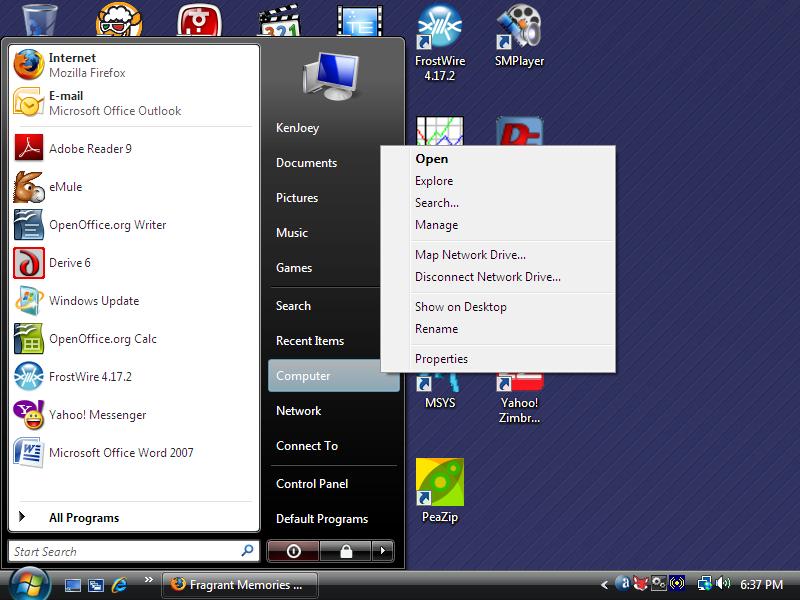
Once your PC restarts, open the Start menu, right-click Computer, and select Manage.


Right-click Computer and select Manage.

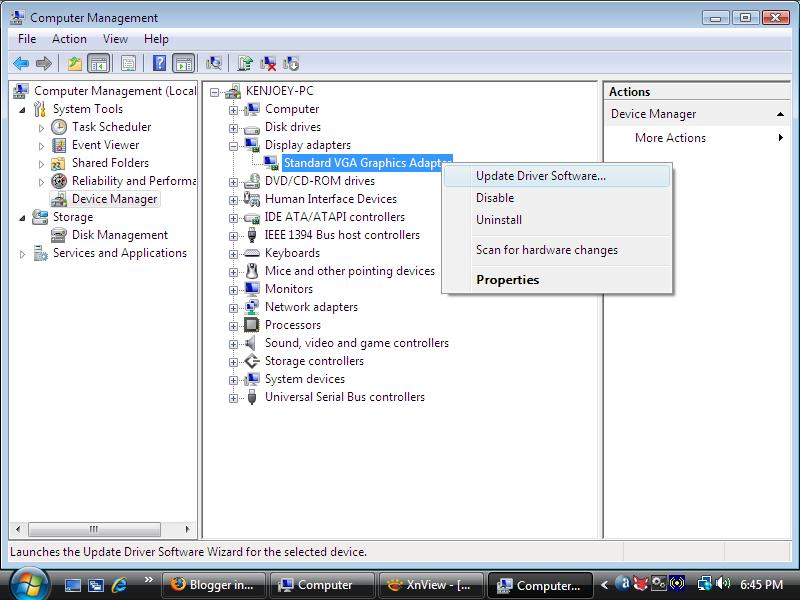
In the left pane, click Device Manager. In the right pane, expand the Display adapters section, right-click Standard VGA Graphics adapter and choose Update Driver Software.


Right-click Standard VGA Graphics adapter and choose Update Driver Software.

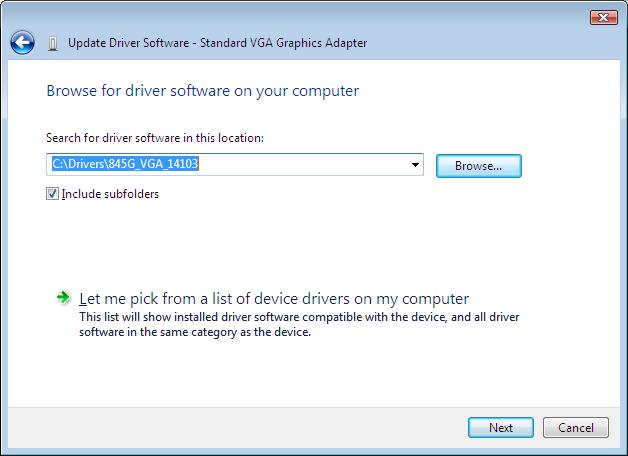
In the pop-up dialog, choose Browse My computer for driver software and indicate the folder where you unpacked the NVIDIA graphics driver. You'll get a warning that Windows can't verify the publisher of the driver. Just ignore the warning and go ahead with the installation. You may have to restart the PC again.


Go ahead with Vista driver installation

Voila, your NVIDIA RIVA TNT2 M64 video card may be a bit old but it still works OK with Windows Vista!

Tuesday, January 6, 2009

Disabling the Sleep Mode in Vista


With the default Vista power settings, pressing the Start menu power button will put the computer into a sleep mode. After newly installing Windows Vista, opening the Start menu will show the power button in amber yellow. This means clicking the power button will put the PC into the power-saving sleep mode instead of turning it off completely. The sleep mode saves the current state of the computer in memory, turns down the fans and keeps the PC quiet until you press a key or move a mouse.


But don't you find it annoying? I do. I want the PC turned off completely when I click the Power button. The following steps show you how to change Vista power settings so that clicking the Power button will turn off the PC:


  1. Click or press the Windows Logo button to open the Start menu.

  2. Click the Control Panel.

  3. Click System and Maintenance.

  4. Click Power Options.

  5. Click Change plan settings under the current preferred plan (by default, Balanced).

  6. Click Change advanced power settings.

  7. When the Power Options window appears, click the plus sign + next to Power buttons and lid to expand the section.

  8. Click the plus sign + next to Start menu power button.

  9. Change the Setting from Sleep to Shut down.

  10. Click OK to change the power options and close the window.

Monday, January 5, 2009

My List of Linux Distros to Try

Here I list Linux distros that I'd like to try and master.


RPM distrosDEB distrosOther distros
FedoraDebianFuduntu
OpenSUSEMintFrugalware
MageiaMEPIS 
   

Sunday, January 4, 2009

Hacking WEP with Backtrack 3

Today, we commonly find wireless networks around us. Most wireless networks are encrypted using WEP or WPA encryption methods. I covered the dictionary attack on WPA networks in a previous post. Compared to WPA, WEP has weak mechanism and is easy to crack.


Theory


At the time of conception, WEP, short for wired equivalent privacy, was believed to be secure. However, a security flaw was found in the IV headers of data packets that makes it possible to crack WEP if enough IV headers are collected. This tutorial takes advantage of this weakness in the initialization vectors of wireless packets to crack WEP. However, a problem may arise when there are multiple keys in use instead of just one.


What's Needed To Test Your Wireless Network


To crack WEP, you need a Backtrack CD and basic knowledge of Linux. Backtrack is a set of tools for testing network security. Download Backtrack and burn it onto a black CD with InfraRecorder or any other tool.


Then, boot your computer with the Backtrack CD. Hopefully, you'll be automatically presented with a nice and dark GUI screen of KDE.


Surveying Wireless Networks with Kismet


Launch Konsole which is located right next to the KDE Start menu. Open /usr/local/etc/kismet.conf in a text editor and edit the source= line to include your wireless device. For example, for Broadcom 43xx based card, put source=bcm43xx,eth1,bcm43xx. Save kismet.conf and start kismet.

Once kismet starts detecting wireless networks around, press s and P to sort the network list by packet counts in descending order. Press Up or Down key to move to the target network and press i for network information or c for client list. Write down such information as:


  • ESSID (wireless network name)
  • BSSID (MAC address of access point)
  • channel of wireless network
  • MAC address of clients

In Kismet, the flags for encryption are Y (WEP), N (No encryption), or O (WPA/WPA2). Press x to close popup windows and Q to exit Kismet.


Dumping Wireless Traffic with Airodump


To hack WEP, you need to use airodump-ng to sniff wireless traffic of the target network and collect good IV's (initialization vectors, a part of WEP encryption data). Type the following commands in a terminal window:


airmon-ng stop wlan0

airmon-ng start wlan0

airodump-ng -w logfile -c 9 --ivs wlan0

The commands above put the network device wlan0 in monitor mode and then use airodump-ng to log the wireless traffic. The -c option specifies the channel to listen to. The screen will show wireless networks and associated clients, if any, with a set of numbers increasing. Don't stop airodump-ng or close the terminal yet. Just leave the terminal open.


Using Aireplay-NG To Generate Traffic


Aireplay-ng is a handy tool that can be used to generate more wireless traffic in order to collect enough good IV's. It does so by injecting or replaying captured packets to fool the access point into giving us what we need.


To Force Association of Clients with Access Point


Open another terminal and enter the following command to associate the target wireless client with the access point:


aireplay-ng -1 30 -e belkin -a 00:11:22:33:44:55 -h 00:fe:21:83:f4:e5 wlan0

The -e option specifies the network name, the -a option specifies the MAC address of the AP, and the -h option specifies the MAC address of the wireless client.


You can use macchanger to view and change your MAC address, for example, macchanger -s wlan0. Then, you can associate your wireless adapter when there are no clients connected to the wireless network in the first place.


ARP Injection with Aireplay


ARP injection is slow but always works. While airodump-ng is listening, run the following command:


aireplay-ng -3 -b 00:11:22:33:44:55 -h 00:fe:21:83:f4:e5 wlan0

Whereas the -b option specifies the MAC address of the AP and -h specifies MAC address of the associated client. Let it run and airodump-ng will pick up traffic. If no client is connected, we can create one by fake authentication described above.


Interactive Packet Replay


This attack generates traffic by asking the access point to resend data packets.


aireplay-ng -2 -b <AP> -h <Client MAC> -n 160 -p 0841 -c FF:FF:FF:FF:FF:FF wlan0

Hacking WEP with Aircrack

Aircrack in Action


After collecting enough IV packets, aircrack-ng can be used to crack the WEP key. The syntax of the aircrack-ng command to use is like:


aircrack-ng -a 1 -b A0:B1:C2:D3:E4:F5 -n 128 logfile-01.ivs

Replace the filename with your log file that was previously generated with airodump-ng. Also, specify the access point's MAC address with -b option. The -n option specifies whether the WEP strength is 64-bit or 128-bit. The -a 1 option specifies that we're cracking WEP.


Can't Crack?


If you still can't crack WEP with tons of IV's, increase the fudge factor with -f N option (N>=2). It'll take much longer to crack but you'll have a better chance at success.


Related Posts


Saturday, January 3, 2009

Intel 845G Driver for Windows Vista

I salvaged an eMachine T1742 from an e-cycling dump. Someone had pried out the memory and hard drive from the unit. So I had to plug in new ones to set up a new PC. Then, I installed Windows Vista Home Premium Lite CD.

Windows Vista didn't recognize Intel 845G/845GL graphics chipset, so installed the driver for generic Standard VGA Graphics Adapter instead. After searching the Internet, I found the driver for Intel 845G/845GL graphics that can be used with Windows Vista. Just go to the Intel website and download the latest driver for Intel 82845G Graphics Controller. This chipset is outdated and in the archived drivers section. Get the Windows XP Professional driver for Intel 82845G Graphics controller.

Download the ZIP file (win2k_xp14103.zip) instead of the .EXE installer. Unpack it somewhere on your computer. Open the Start menu, right-click Computer, and select Manage.


Right-click Computer and select Manage.

In the left pane, click Device Manager. In the right pane, expand the Display adapters section, right-click Standard VGA Graphics adapter, and choose Update Driver Software.


Right-click Standard VGA Graphics adapter and choose Update Driver Software.

In the pop-up dialog, choose Browse My computer for driver software, and indicate the folder where you unpacked the Intel 82845G graphics driver.


Specify the folder where you put Intel 82845G driver.

If you get a warning that the driver is not digitally signed or authentic, just ignore the warning and go on with the installation. You may have to restart the PC.

One caveat with the driver is that the display may appear too bright at each boot time. Just adjust the Gamma, brightness and contrast settings in the Intel 845G control panel.

Friday, January 2, 2009

Project Directive: Building an Industrial PC

Project Directive


This directive outlines the purpose and requirements of the computer to be built in the near future.


Purpose of the Product


The machine will serve various purposes as stated below.


  1. Internet Gateway: The machine will be running almost always with constant wired or wireless connection to the Internet. The machine will have a gateway capability to connect other machines to the Internet via an Ethernet switch or wireless connection.
  2. Network Server: The machine will store and serve files (ex. pictures, music, movies, etc.) to clients both on private network and the Internet. However, the served files shall be stored and retrieved from an external storage device connected via USB, Firewire or eSATA.
  3. Internet Entertainment: The machine may be casually used to browse the Internet, hang out in social networks, read news, check Web mail and engage in text/voice/video conversation with others on the Internet.
  4. Multimedia Player: The machine will be able to play music, Internet radio and movies on stereo system, TV or monitor. It may be optionally controlled by a remote controller, wireless keyboard or mouse.
  5. Time-consuming Computations: The machine will optionally perform various computational tasks such as compilation of executable codes, encryption, decryption, statistical analysis and conversion of data.


Hardware Requirements


The machine shall occupy minimal space, and operate quietly and energy-efficiently.


  1. Its circuit board will be in Pico-ITX (100x72mm), Nano-ITX (120x120mm), Mini-ITX (170x170mm), or similarly compact form.
  2. The CPU will be Mobile AMD Sempron, VIA Nano or Intel Atom. In order to maintain quiet operation, it is recommended that the CPU have no fan attached.
  3. At least 256MB of volatile memory is required. SODIMM-type memory is recommended.
  4. Non-volatile memory will take the form of compact flash, Solid-State Drive or 2.5 inch hard drive. At least 256MB of non-volatile memory is required. Additional storage will be attached externally through USB, Firewire or eSATA ports.
  5. The machine will have a minimum number of external connectors such as one PS/2, VGA, S-Video, audio in/out, LAN and at least 2 USB ports. No serial or parallel port is required.
  6. The machine will contain no floppy or CD-ROM drive.


Software Requirements


The primary operating system will be Linux. Optionally, Windows XP or Windows Vista will be installed as a dual-boot option.


  1. The non-volatile memory storage in the system will store a functional boot loader that can boot the system from internal storage, external storage attached via USB/Firewire/eSATA, or network storage via BOOTP/TFTP.
  2. It is optional but recommended for the internal storage to contain a functional Linux operating system that meets the project purposes stated above. No private user-specific information shall be stored. For stability and data integrity, it is also recommended to write-protect the operating system and disable modification for a long period of time. Periodically (monthly, quarterly, every 4 months, or semianually), the whole operating system will be unlocked, updated with newer versions, and optimized with new settings.
  3. If Windows operating system is to be used, it will be installed on a USB hard drive and started by the boot loader.
  4. All variable/extraneous settings and data will be stored externally on a USB flash or USB hard drive.
  5. The machine should allow remote logins by local computers via SSH, HTTP, VNC or Remote Desktop sessions.


Candidate Parts


About This Blog

KBlog logo This blog seeks to share useful information on freely available fonts on the Internet. Thanks for visiting the blog and posting your comments.

© Contents by KBlog

© Blogger template by Emporium Digital 2008

Followers

Total Pageviews

CyberChimps Professional WordPress Themes
Powered By Blogger