LinkShare rotating banner
Showing posts with label driver. Show all posts

Sunday, September 30, 2012

To Compile ndiswrapper 1.58rc1 for Linux 3.5.4

ndiswrapper allows Linux users to use Windows drivers for PCI/USB network adapters on Linux. If you own a network device for which Linux support is still absent or premature, then you need to compile ndiswrapper yourself and install Windows driver for your network device. Fortunately, today's Linux supports most network devices out-of-box, so most distributions don't bother to include ndiswrapper. However, I am compiling ndiswrapper believing that Windows NDIS drivers would outperform native Linux drivers.


To my surprise, building the latest version of ndiswrapper (1.58rc1) did not require any patch. After compiling Linux 3.5.4, I downloaded the ndiswrapper source from the sourceforge site. I chose the testing version because I thought it would work better with Linux 3.5.x. I unpacked the source.


tar xzvf ndiswrapper-1.58rc1.tar.gz
cd ndiswrapper-1.58rc1


I typed the following commands to compile and install ndiswrapper.


KVERS=3.5.4 make uninstall
KVERS=3.5.4 make
KVERS=3.5.4 make install


Then, I generated modules.* files again.


depmod -e -m -F /boot/System.map-3.5.4 3.5.4


The following files were installed by ndiswrapper.


/lib/modules/3.5.4/misc/ndiswrapper.ko
/sbin/loadndisdriver
/usr/sbin/ndiswrapper
/usr/sbin/ndiswrapper-buginfo
/usr/share/man/man8/loadndisdriver.8
/usr/share/man/man8/ndiswrapper.8


Also read:


Sunday, May 3, 2009

Windows 98/ME Driver for NEC/Belkin USB 2.0 Controller

I recently installed Windows ME and noticed that Windows ME didn't include drivers for USB 2.0 controllers. I have a Belkin USB 2.0 enhanced controller. It took me a while to find a Windows 98/ME driver for my USB 2.0 card. After searching Yahoo! I found 2 drivers. The first one is the Orangeware driver (Download it HERE) and has the following contents:


OUSB2.INF
OUSB2HUB.SYS
OUSBEHCI.SYS


The other driver (Download NECUSB2.ZIP or HERE) contains the following files:


NEHCD.SYS
NUSBD.SYS
Nehcd.inf
ReadMe.doc

Wednesday, January 7, 2009

NVIDIA RIVA TNT2 M64 Driver for Windows Vista

I decided to install NVIDIA RIVA TNT2 M64 for use with Windows Vista because the on-board graphics chip didn't work so well. Like many old video cards, Windows Vista doesn't include a driver for NVIDIA RIVA TNT2 M64 cards. So I've tried many different versions of NVIDIA unified drivers. Finally I found the one that works perfectly with Windows Vista.


You should install NVIDIA ForceWare version 72.14 to be able to use an NVIDIA RIVA TNT2 M64 video card with Windows Vista. Download it HERE.


This driver is not certified for Windows Vista. Therefore, you should manually install the video driver. First, download and install the NVIDIA ForceWare 72.14. You may be asked to restart the computer. Just do so.


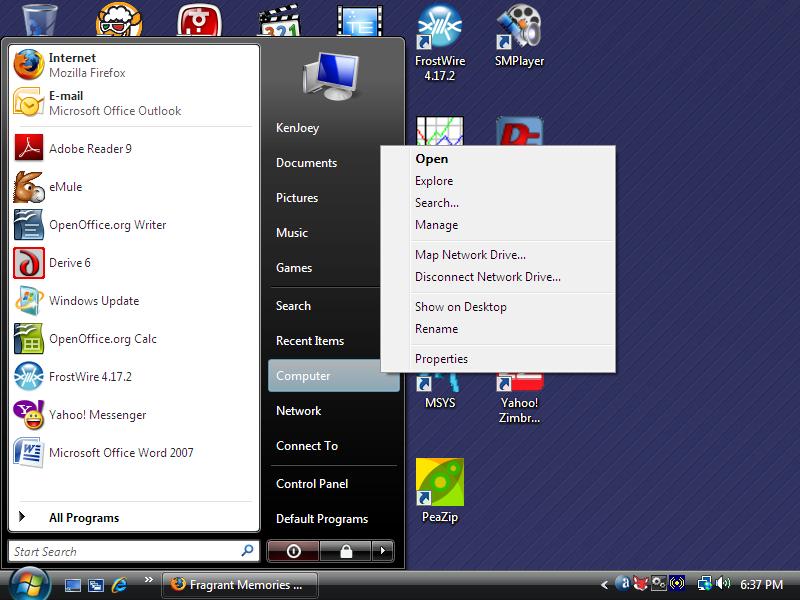
Once your PC restarts, open the Start menu, right-click Computer, and select Manage.


Right-click Computer and select Manage.

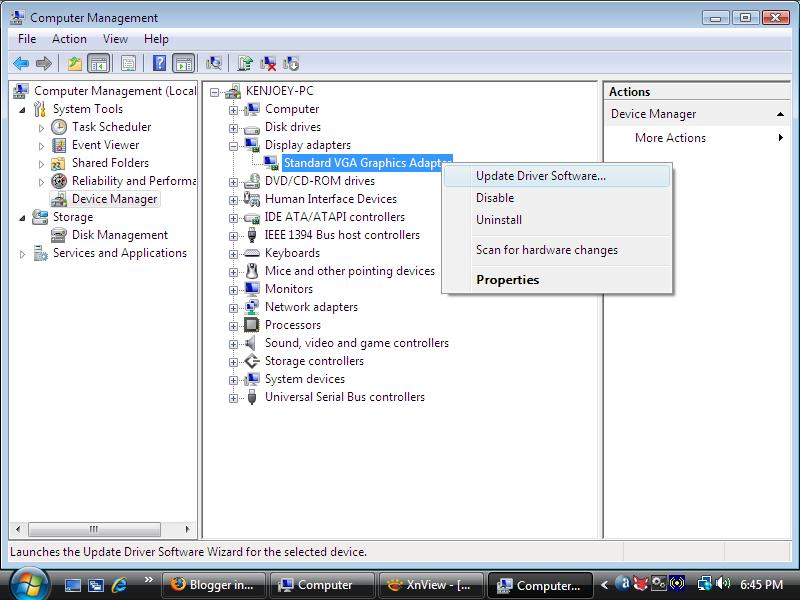
In the left pane, click Device Manager. In the right pane, expand the Display adapters section, right-click Standard VGA Graphics adapter and choose Update Driver Software.


Right-click Standard VGA Graphics adapter and choose Update Driver Software.

In the pop-up dialog, choose Browse My computer for driver software and indicate the folder where you unpacked the NVIDIA graphics driver. You'll get a warning that Windows can't verify the publisher of the driver. Just ignore the warning and go ahead with the installation. You may have to restart the PC again.


Go ahead with Vista driver installation

Voila, your NVIDIA RIVA TNT2 M64 video card may be a bit old but it still works OK with Windows Vista!

Saturday, January 3, 2009

Intel 845G Driver for Windows Vista

I salvaged an eMachine T1742 from an e-cycling dump. Someone had pried out the memory and hard drive from the unit. So I had to plug in new ones to set up a new PC. Then, I installed Windows Vista Home Premium Lite CD.

Windows Vista didn't recognize Intel 845G/845GL graphics chipset, so installed the driver for generic Standard VGA Graphics Adapter instead. After searching the Internet, I found the driver for Intel 845G/845GL graphics that can be used with Windows Vista. Just go to the Intel website and download the latest driver for Intel 82845G Graphics Controller. This chipset is outdated and in the archived drivers section. Get the Windows XP Professional driver for Intel 82845G Graphics controller.

Download the ZIP file (win2k_xp14103.zip) instead of the .EXE installer. Unpack it somewhere on your computer. Open the Start menu, right-click Computer, and select Manage.


Right-click Computer and select Manage.

In the left pane, click Device Manager. In the right pane, expand the Display adapters section, right-click Standard VGA Graphics adapter, and choose Update Driver Software.


Right-click Standard VGA Graphics adapter and choose Update Driver Software.

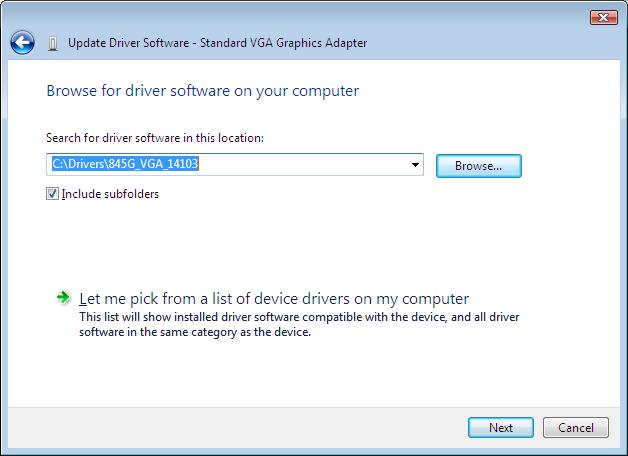
In the pop-up dialog, choose Browse My computer for driver software, and indicate the folder where you unpacked the Intel 82845G graphics driver.


Specify the folder where you put Intel 82845G driver.

If you get a warning that the driver is not digitally signed or authentic, just ignore the warning and go on with the installation. You may have to restart the PC.

One caveat with the driver is that the display may appear too bright at each boot time. Just adjust the Gamma, brightness and contrast settings in the Intel 845G control panel.

About This Blog

KBlog logo This blog seeks to share useful information on freely available fonts on the Internet. Thanks for visiting the blog and posting your comments.

© Contents by KBlog

© Blogger template by Emporium Digital 2008

Followers

Total Pageviews

CyberChimps Professional WordPress Themes
Powered By Blogger