LinkShare rotating banner

Sunday, April 4, 2010

윈도용 MPlayer / Mencoder 사용 및 설정

MinGW로 컴파일한 MPlayer를 시험해 보고 최적으로 설정해 보자. 다음은 내가 컴파일한 MPlayer와 Mencoder이다. bzip2.exe로 압축을 풀어야 한다(bzip2 -d mplayer.exe.bz2).


  1. DirectX 8.1 설치(Windows 95/98/ME Only)


    업데이트: Windows 98/ME 사용자도 아래의 DirectX 9.0c를 설치할 수 있다. 만일 DirectX 9을 설치할 경우, DirectX 8.1을 설치할 필요가 없게 된다.


    Windows 98/ME 사용자는 DirectX 8.0a, DirectX 8.1b 혹은 DirectX 8.2를 받아서 설치해야 MPlayer가 제대로 작동한다. 다음은 다운로드 링크를 여러 군데 모은 것이다.


    DirectX 8.1는 Windows XP에 포함되어 있다.


  2. DirectX 9.0c 설치


    MPlayer의 최신 개발 코드는 기본적으로 DirectX 9와 링크되도록 되어 있다. 그러므로 이렇게 만든 mplayer.exe 실행 파일을 Windows 98/ME/XP에서 실행하면 DirectX 9를 못 찾고 오류가 발생할 수가 있다. 이러한 오류를 방지하기 위해 MPlayer를 configure 할 때 --disable-direct3d 옵션을 주어서 DX9 링크 못하게 할 수 있다. 그렇지 않으면 filehippo.com에서 DirectX 9.0c 2006년 12월 릴리스를 받아서 설치해야 한다.


  3. MPlayer의 간단한 명령행 도움말


    mplayer.exe를 처음 실행하면 검은 콘솔 창이 나타나 아래처럼 짧은 도움말이 나온다.


    MPlayer SVN-r29464-snapshot-3.4.5 (C) 2000-2009 MPlayer Team
    Usage: mplayer [options] [url|path/]filename

    Basic options: (complete list in the man page)
    -vo select video output driver ('-vo help' for a list)
    -ao select audio output driver ('-ao help' for a list)
    vcd:// play (S)VCD (Super Video CD) track (raw device, no mount)
    dvd:// play DVD title from device instead of plain file
    -alang/-slang select DVD audio/subtitle language (by 2-char country code)
    -ss seek to given (seconds or hh:mm:ss) position
    -nosound do not play sound
    -fs fullscreen playback (or -vm, -zoom, details in the man page)
    -x -y set display resolution (for use with -vm or -zoom)
    -sub specify subtitle file to use (also see -subfps, -subdelay)
    -playlist specify playlist file
    -vid x -aid y select video (x) and audio (y) stream to play
    -fps x -srate y change video (x fps) and audio (y Hz) rate
    -pp enable postprocessing filter (details in the man page)
    -framedrop enable frame dropping (for slow machines)

    Basic keys: (complete list in the man page, also check input.conf)
    <- or -> seek backward/forward 10 seconds
    down or up seek backward/forward 1 minute
    pgdown or pgup seek backward/forward 10 minutes
    < or > step backward/forward in playlist
    p or SPACE pause movie (press any key to continue)
    q or ESC stop playing and quit program
    + or - adjust audio delay by +/- 0.1 second
    o cycle OSD mode: none / seekbar / seekbar + timer
    * or / increase or decrease PCM volume
    x or z adjust subtitle delay by +/- 0.1 second
    r or t adjust subtitle position up/down, also see -vf expand

    * * * SEE THE MAN PAGE FOR DETAILS, FURTHER (ADVANCED) OPTIONS AND KEYS * * *


    mplayer -vo help 명령은 다음과 같이 어떤 화면 출력 장치가 사용 가능한지 보여 준다.


    MPlayer SVN-r29464-snapshot-3.4.5 (C) 2000-2009 MPlayer Team
    Available video output drivers:
    directx Directx DDraw YUV/RGB/BGR renderer
    direct3d Direct3D 9 Renderer
    gl X11 (OpenGL)
    gl2 X11 (OpenGL) - multiple textures version
    winvidix WIN32 (VIDIX)
    cvidix console VIDIX
    null Null video output
    mpegpes MPEG-PES file
    yuv4mpeg yuv4mpeg output for mjpegtools
    png PNG file
    jpeg JPEG file
    gif89a animated GIF output
    tga Targa output
    pnm PPM/PGM/PGMYUV file
    md5sum md5sum of each frame

    mplayer -ao help 명령은 어떤 음향 출력 장치가 사용 가능한지 보여 준다.


    MPlayer SVN-r29464-snapshot-3.4.5 (C) 2000-2009 MPlayer Team
    Available audio output drivers:
    dsound Windows DirectSound audio output
    win32 Windows waveOut audio output
    mpegpes MPEG-PES audio output
    null Null audio output
    pcm RAW PCM/WAVE file writer audio output


  4. MPlayer 시험


    일단 명령 프롬프트(cmd.exe)나 실행 대화창(Run...)에서 다음과 같은 명령을 입력하여 MPlayer를 테스트해 보자. 위에 보이는 -vo 도움말과 -ao 도움말을 참고하여 자신의 시스템에 가장 알맞은 옵션을 찾아 보자.


    mplayer -vo direct3d -ao dsound -font C:\WINDOWS\FONTS\Tahoma.ttf -framedrop mymoviefile.avi

    또는 좀 느리지만 기본적인 출력 장치로 GL과 win32를 사용해 볼 수 있다.


    mplayer -vo gl -ao win32 Bear.wmv

    샘플 동영상 파일은 인터넷에서 검색하여 받도록 한다. Vista와 Windows 7 사용자는 C:\Users\Public\Videos\Sample Videos 폴더에 있는 샘플 동영상 파일로 MPlayer를 테스트해 볼 수 있다.


  5. MPlayer 설정


    처음으로 MPlayer를 실행하기 전에 HOME 환경변수를 정하여 자신의 폴더를 정해 준다. 그리고 MPlayer를 처음으로 더블클릭하면 사용자의 %HOME% 디렉토리에 “mplayer”라는 폴더가 생기고 그 안에 "config"라는 파일이 있다. "config" 파일에 다음과 같이 설정 사항을 적는다:


    # Write your default config options here!
    cdrom-device=D:
    dvd-device=D:
    ao=dsound
    vo=direct3d
    font=C:\WINDOWS\FONTS\MALGUN.TTF
    framedrop=yes
    subcp=cp949

    Windows 98/ME 사용자는 화면 출력 장치 설정으로 vo=direct3d 대신에 vo=directx 또는 vo=directx:noaccel 라고 적어야 한다. directx:noaccel은 가속 기능이 없는 DirectDraw 출력 장치인데 화면 출력에 문제가 있을 경우에 사용한다.


  6. MPlayer 코덱


    MPlayer 코덱을 받는 게 좋다. 파일 이름은 windows-essential-20071007.zip이다. 압축을 풀면 "windows-essential-20071007" 폴더가 나오는데 "codecs"으로 이름을 바꾸어 mplayer.exe가 있는 폴더로 옮기도록 한다.


    또한, MPlayer 소스의 etc 디렉토리에 codecs.conf 파일이 있을 것이다. 이것을 사용자의 mplayer 폴더에 복사해 놓는다. 그리고 mplayer를 실행하면 메시지 첫머리에 다음과 같이 코덱 숫자가 표시된다.


    MPlayer SVN-r29464-snapshot-3.4.5 (C) 2000-2009 MPlayer Team
    138 audio & 299 video codecs
    Usage: mplayer [options] [url|path/]filename

    이제 다음 명령어를 실행하면 mplayer 코덱에 관한 정보가 나올 것이다.


    mplayer -vc help
    mplayer -ac help


  7. 다음처럼 동영상을 볼 수 있다:

    mplayer mymoviefile.avi > C:\Windows\Temp\error.txt

    이제 남은 일은 SMPlayer를 받아서 MPlayer 인터페이스로 설정하는 것이다.


Friday, April 2, 2010

MP4Box Usage

To package a MPEG-4 Video


Wrap up the raw H.264 video along with chapters inside a MPEG-4 container.


MP4Box -add video.264 -chap chapters.txt -fps 23.976 film.m4v


To Find Info on the First Track inside a .M4V file


MP4Box -info 1 movie.m4v


To Extract H.264 Video from a .M4V file


MP4Box -raw 1 movie.m4v


To Extract AAC audio from M4A file


Use MP4Box to extract AAC audio from a .M4A file like this:


MP4Box -raw 1 music.m4a

Thursday, April 1, 2010

윈도용 MPlayer와 Mencoder 정적 컴파일

Windows에서 MPlayer/Mencoder를 컴파일하려면 MinGW 컴파일러가 필요하다. 이 글을 읽고 MinGW를 설치하도록 한다. 이 글은 정적 실행 파일(특별한 DLL에 의존하지 않는 단일 프로그램)을 생성하기 위해 쓰여졌다. 동적 실행 파일을 만들려면 이 글을 읽기 바란다.


시작 메뉴에서 MSYS (rxvt)를 오른쪽 클릭하여 관리자로 실행한다. Windows Vista와 Windows 7에서 문제 없이 컴파일하기 위함이다.


  1. LZO 라이브러리는 빠른 압축 기능으로 순수 비디오를 압축하는 데 쓰인다.

    tar xzvf lzo-2.03.tar.gz
    cd lzo-2.03
    ./configure --prefix=/mingw
    make
    make install

  2. Zlib는 압축 헤더가 붙은 몇몇 mov 파일을 보기 위해 필요하다. zlib.net에서 소스를 받아 컴파일한다:

    cd ~

    tar xjvf zlib-1.2.4.tar.bz2

    cd zlib-1.2.4

    ./configure --prefix=/mingw

    make

    make install


  3. PNG 이미지 라이브러리


    영화 보는 데 PNG 라이브러리가 왜 필요한지 궁금할 것이다. 가끔 영화의 인상적인 부분을 한 장면 한 장면 사진으로 저장하고 싶을 때 쓸 수 있다. PNG 라이브러리 소스를 받아 컴파일하자:


    cd ~
    tar xzvf libpng-1.4.1.tar.gz
    cd libpng-1.4.1/
    ./configure --prefix=/mingw --disable-shared
    make
    make install


  4. Freetype 및 Iconv 라이브러리


    Freetype은 자막 표시에 필요하다. iconv 라이브러리에 의존하므로 먼저 iconv 소스를 받아 컴파일하자:


    cd ~

    tar xvzf libiconv-1.13.1.tar.gz

    cd libiconv-1.13.1

    ./configure --prefix=/mingw --disable-shared

    make

    make install

    그런 다음, Freetype2를 받아 컴파일한다:


    cd ~

    tar xzvf freetype-2.3.12.tar.gz

    cd freetype-2.3.12

    ./configure --prefix=/mingw --disable-shared

    make

    make install


  5. Fontconfig 라이브러리는 SSA 자막 표시에 필요하다. expat 라이브러리에 의존하므로 먼저 expat 라이브러리를 컴파일하자.

    cd ~
    tar xzvf expat-2.0.1.tar.gz
    cd expat-2.0.1/
    ./configure --prefix=/mingw --disable-shared
    make install

    그리고 fontconfig 라이브러리를 컴파일한다.

    cd
    tar xzvf fontconfig-2.8.0.tar.gz
    cd fontconfig-2.8.0/
    ./configure --prefix=/mingw --disable-shared
    make install


  6. Libcdio 소스를 여기서 받아 컴파일하고 설치하자.

    tar xzvf libcdio-0.81.tar.gz

    cd libcdio-0.81

    ./configure --prefix=/mingw --disable-shared

    make

    make install


  7. Libogg, Libvorbis, speex, Theora 컴파일


    libogg, libvorbis, speex 그리고 theora 라이브러리 모두 xiph.org에서 받아 다음과 같이 컴파일하자:


    ./configure --prefix=/mingw --disable-shared

    make

    make install


  8. DirectX 헤더를 아래의 위치에서 받아서:


    MinGW의 include 폴더(예를 들어, C:\MinGW\include)에 압축을 푼다.


  9. MPlayer 정적 컴파일을 위한 configure 명령


    pkg-config.exe와 yasm.exe를 받아서 /mingw/bin에 저장한다. MPlayer 소스를 받아서 풀자:


    tar xjvf mplayer-export-snapshot.tar.bz2
    cd mplayer-export-2009-08-02/

    다음과 같이 configure 명령어를 입력한다.


    ./configure --prefix=/mingw --enable-runtime-cpudetection --enable-static --enable-theora --disable-vidix --yasm=/mingw/bin/yasm


  10. configure가 끝나면 config.mak를 열어서 손보자. MPlayer.exe를 실행할 때 검은 로그 창이 나타나는 현상을 원하지 않는다면 EXTRALIBS_MPLAYER= 행에 -mwindows 추가하도록 한다:

    EXTRALIBS_MPLAYER =  -mwindows -lopengl32 -lgdi32 -lwinmm -ld3d9 -lfaac -lx264 -lmp3lame


  11. MPlayer/Mencoder 컴파일


    드디어 MPlayer 컴파일을 시작한다.


    make

    컴파일이 성공적으로 끝나면 mplayer.exe 그리고 mencoder.exe 두 개의 파일이 생긴다. strip 명령을 쓰면 실행 파일의 크기를 약간 줄일 수 있다.


    strip m*.exe

    UPX로 압축한다.


    upx --best --strip-relocs=0 mplayer.exe
    upx --best --strip-relocs=0 mencder.exe

    가령, C:\Program Files로 복사하도록 한다.


    cp -iv m*.exe /c/Program\ Files


mplayer.exe와 mencoder.exe 두 개의 실행 파일이 성공적으로 만들어졌으니, 이제 MPlayer를 테스트하고 설정하는 일이 남았다.

Friday, June 12, 2009

Packaging, Installing and Configuring GTK+ 2 for Windows

After compiling GTK+ for Windows, we're ready to install and set up GTK+. First, make a Zip archive containing the following files, preserving the directory structure:


bin/charset.dll
bin/cjpeg.exe
bin/djpeg.exe
bin/fc-cache.exe
bin/fc-cat.exe
bin/fc-list.exe
bin/fc-match.exe
bin/gdk-pixbuf-query-loaders.exe
bin/gspawn-win32-helper-console.exe
bin/gspawn-win32-helper.exe
bin/gtk-query-immodules-2.0.exe
bin/iconv.dll
bin/iconv.exe
bin/intl.dll
bin/jpegtran.exe
bin/libatk-1.0-0.dll
bin/libcairo-2.dll
bin/libcharset-1.dll
bin/libexpat-1.dll
bin/libfontconfig-1.dll
bin/libfreetype-6.dll
bin/libgailutil-18.dll
bin/libgdk-win32-2.0-0.dll
bin/libgdk_pixbuf-2.0-0.dll
bin/libgio-2.0-0.dll
bin/libglib-2.0-0.dll
bin/libgmodule-2.0-0.dll
bin/libgobject-2.0-0.dll
bin/libgthread-2.0-0.dll
bin/libgtk-win32-2.0-0.dll
bin/libiconv-2.dll
bin/libintl-8.dll
bin/libjpeg-62.dll
bin/libjpeg-7.dll
bin/libpango-1.0-0.dll
bin/libpangocairo-1.0-0.dll
bin/libpangoft2-1.0-0.dll
bin/libpangowin32-1.0-0.dll
bin/libpixman-1-0.dll
bin/libpng-3.dll
bin/libpng12-0.dll
bin/libtiff-3.dll
bin/libtiffxx-3.dll
bin/libxml2-2.dll
bin/pango-querymodules.exe
bin/rdjpgcom.exe
bin/wrjpgcom.exe
bin/xmlwf.exe
bin/zlib1.dll
etc/fonts/conf.avail/10-autohint.conf
etc/fonts/conf.avail/10-no-sub-pixel.conf
etc/fonts/conf.avail/10-sub-pixel-bgr.conf
etc/fonts/conf.avail/10-sub-pixel-rgb.conf
etc/fonts/conf.avail/10-sub-pixel-vbgr.conf
etc/fonts/conf.avail/10-sub-pixel-vrgb.conf
etc/fonts/conf.avail/10-unhinted.conf
etc/fonts/conf.avail/20-fix-globaladvance.conf
etc/fonts/conf.avail/20-unhint-small-vera.conf
etc/fonts/conf.avail/25-unhint-nonlatin.conf
etc/fonts/conf.avail/30-metric-aliases.conf
etc/fonts/conf.avail/30-urw-aliases.conf
etc/fonts/conf.avail/40-nonlatin.conf
etc/fonts/conf.avail/45-latin.conf
etc/fonts/conf.avail/49-sansserif.conf
etc/fonts/conf.avail/50-user.conf
etc/fonts/conf.avail/51-local.conf
etc/fonts/conf.avail/60-latin.conf
etc/fonts/conf.avail/65-fonts-persian.conf
etc/fonts/conf.avail/65-khmer.conf
etc/fonts/conf.avail/65-nonlatin.conf
etc/fonts/conf.avail/69-unifont.conf
etc/fonts/conf.avail/70-no-bitmaps.conf
etc/fonts/conf.avail/70-yes-bitmaps.conf
etc/fonts/conf.avail/80-delicious.conf
etc/fonts/conf.avail/90-synthetic.conf
etc/fonts/conf.d/20-fix-globaladvance.conf
etc/fonts/conf.d/20-unhint-small-vera.conf
etc/fonts/conf.d/30-metric-aliases.conf
etc/fonts/conf.d/30-urw-aliases.conf
etc/fonts/conf.d/40-nonlatin.conf
etc/fonts/conf.d/45-latin.conf
etc/fonts/conf.d/49-sansserif.conf
etc/fonts/conf.d/50-user.conf
etc/fonts/conf.d/51-local.conf
etc/fonts/conf.d/60-latin.conf
etc/fonts/conf.d/65-fonts-persian.conf
etc/fonts/conf.d/65-nonlatin.conf
etc/fonts/conf.d/69-unifont.conf
etc/fonts/conf.d/80-delicious.conf
etc/fonts/conf.d/90-synthetic.conf
etc/fonts/conf.d/README
etc/fonts/fonts.conf
etc/fonts/fonts.dtd
etc/gtk-2.0/gdk-pixbuf.loaders
etc/gtk-2.0/gtk.immodules
etc/gtk-2.0/gtkrc
etc/gtk-2.0/im-multipress.conf
etc/pango/pango.modules
lib/charset.alias
lib/gtk-2.0/2.10.0/engines/libpixmap.dll
lib/gtk-2.0/2.10.0/engines/libwimp.dll
lib/gtk-2.0/2.10.0/immodules/im-am-et.dll
lib/gtk-2.0/2.10.0/immodules/im-cedilla.dll
lib/gtk-2.0/2.10.0/immodules/im-cyrillic-translit.dll
lib/gtk-2.0/2.10.0/immodules/im-inuktitut.dll
lib/gtk-2.0/2.10.0/immodules/im-ipa.dll
lib/gtk-2.0/2.10.0/immodules/im-multipress.dll
lib/gtk-2.0/2.10.0/immodules/im-thai.dll
lib/gtk-2.0/2.10.0/immodules/im-ti-er.dll
lib/gtk-2.0/2.10.0/immodules/im-ti-et.dll
lib/gtk-2.0/2.10.0/immodules/im-viqr.dll
lib/gtk-2.0/modules/libgail.dll
lib/locale/af/LC_MESSAGES/atk10.mo
lib/locale/af/LC_MESSAGES/gtk20-properties.mo
lib/locale/af/LC_MESSAGES/gtk20.mo
lib/locale/am/LC_MESSAGES/atk10.mo
lib/locale/am/LC_MESSAGES/glib20.mo
lib/locale/am/LC_MESSAGES/gtk20-properties.mo
lib/locale/am/LC_MESSAGES/gtk20.mo
lib/locale/ang/LC_MESSAGES/gtk20-properties.mo
lib/locale/ang/LC_MESSAGES/gtk20.mo
lib/locale/ar/LC_MESSAGES/atk10.mo
lib/locale/ar/LC_MESSAGES/glib20.mo
lib/locale/ar/LC_MESSAGES/gtk20-properties.mo
lib/locale/ar/LC_MESSAGES/gtk20.mo
lib/locale/as/LC_MESSAGES/atk10.mo
lib/locale/as/LC_MESSAGES/glib20.mo
lib/locale/as/LC_MESSAGES/gtk20-properties.mo
lib/locale/as/LC_MESSAGES/gtk20.mo
lib/locale/ast/LC_MESSAGES/gtk20-properties.mo
lib/locale/ast/LC_MESSAGES/gtk20.mo
lib/locale/az/LC_MESSAGES/atk10.mo
lib/locale/az/LC_MESSAGES/glib20.mo
lib/locale/az/LC_MESSAGES/gtk20-properties.mo
lib/locale/az/LC_MESSAGES/gtk20.mo
lib/locale/az_IR/LC_MESSAGES/gtk20-properties.mo
lib/locale/az_IR/LC_MESSAGES/gtk20.mo
lib/locale/be/LC_MESSAGES/atk10.mo
lib/locale/be/LC_MESSAGES/glib20.mo
lib/locale/be/LC_MESSAGES/gtk20-properties.mo
lib/locale/be/LC_MESSAGES/gtk20.mo
lib/locale/be@latin/LC_MESSAGES/atk10.mo
lib/locale/be@latin/LC_MESSAGES/glib20.mo
lib/locale/be@latin/LC_MESSAGES/gtk20-properties.mo
lib/locale/be@latin/LC_MESSAGES/gtk20.mo
lib/locale/bg/LC_MESSAGES/atk10.mo
lib/locale/bg/LC_MESSAGES/glib20.mo
lib/locale/bg/LC_MESSAGES/gtk20-properties.mo
lib/locale/bg/LC_MESSAGES/gtk20.mo
lib/locale/bn/LC_MESSAGES/atk10.mo
lib/locale/bn/LC_MESSAGES/glib20.mo
lib/locale/bn/LC_MESSAGES/gtk20-properties.mo
lib/locale/bn/LC_MESSAGES/gtk20.mo
lib/locale/bn_IN/LC_MESSAGES/atk10.mo
lib/locale/bn_IN/LC_MESSAGES/glib20.mo
lib/locale/bn_IN/LC_MESSAGES/gtk20-properties.mo
lib/locale/bn_IN/LC_MESSAGES/gtk20.mo
lib/locale/br/LC_MESSAGES/gtk20-properties.mo
lib/locale/br/LC_MESSAGES/gtk20.mo
lib/locale/bs/LC_MESSAGES/atk10.mo
lib/locale/bs/LC_MESSAGES/glib20.mo
lib/locale/bs/LC_MESSAGES/gtk20-properties.mo
lib/locale/bs/LC_MESSAGES/gtk20.mo
lib/locale/ca/LC_MESSAGES/atk10.mo
lib/locale/ca/LC_MESSAGES/glib20.mo
lib/locale/ca/LC_MESSAGES/gtk20-properties.mo
lib/locale/ca/LC_MESSAGES/gtk20.mo
lib/locale/ca@valencia/LC_MESSAGES/glib20.mo
lib/locale/ca@valencia/LC_MESSAGES/gtk20-properties.mo
lib/locale/ca@valencia/LC_MESSAGES/gtk20.mo
lib/locale/crh/LC_MESSAGES/gtk20-properties.mo
lib/locale/crh/LC_MESSAGES/gtk20.mo
lib/locale/cs/LC_MESSAGES/atk10.mo
lib/locale/cs/LC_MESSAGES/glib20.mo
lib/locale/cs/LC_MESSAGES/gtk20-properties.mo
lib/locale/cs/LC_MESSAGES/gtk20.mo
lib/locale/cy/LC_MESSAGES/atk10.mo
lib/locale/cy/LC_MESSAGES/glib20.mo
lib/locale/cy/LC_MESSAGES/gtk20-properties.mo
lib/locale/cy/LC_MESSAGES/gtk20.mo
lib/locale/da/LC_MESSAGES/atk10.mo
lib/locale/da/LC_MESSAGES/glib20.mo
lib/locale/da/LC_MESSAGES/gtk20-properties.mo
lib/locale/da/LC_MESSAGES/gtk20.mo
lib/locale/de/LC_MESSAGES/atk10.mo
lib/locale/de/LC_MESSAGES/glib20.mo
lib/locale/de/LC_MESSAGES/gtk20-properties.mo
lib/locale/de/LC_MESSAGES/gtk20.mo
lib/locale/dz/LC_MESSAGES/atk10.mo
lib/locale/dz/LC_MESSAGES/glib20.mo
lib/locale/dz/LC_MESSAGES/gtk20-properties.mo
lib/locale/dz/LC_MESSAGES/gtk20.mo
lib/locale/el/LC_MESSAGES/atk10.mo
lib/locale/el/LC_MESSAGES/glib20.mo
lib/locale/el/LC_MESSAGES/gtk20-properties.mo
lib/locale/el/LC_MESSAGES/gtk20.mo
lib/locale/en_CA/LC_MESSAGES/atk10.mo
lib/locale/en_CA/LC_MESSAGES/glib20.mo
lib/locale/en_CA/LC_MESSAGES/gtk20-properties.mo
lib/locale/en_CA/LC_MESSAGES/gtk20.mo
lib/locale/en_GB/LC_MESSAGES/atk10.mo
lib/locale/en_GB/LC_MESSAGES/glib20.mo
lib/locale/en_GB/LC_MESSAGES/gtk20-properties.mo
lib/locale/en_GB/LC_MESSAGES/gtk20.mo
lib/locale/eo/LC_MESSAGES/atk10.mo
lib/locale/eo/LC_MESSAGES/glib20.mo
lib/locale/eo/LC_MESSAGES/gtk20-properties.mo
lib/locale/eo/LC_MESSAGES/gtk20.mo
lib/locale/es/LC_MESSAGES/atk10.mo
lib/locale/es/LC_MESSAGES/glib20.mo
lib/locale/es/LC_MESSAGES/gtk20-properties.mo
lib/locale/es/LC_MESSAGES/gtk20.mo
lib/locale/et/LC_MESSAGES/atk10.mo
lib/locale/et/LC_MESSAGES/glib20.mo
lib/locale/et/LC_MESSAGES/gtk20-properties.mo
lib/locale/et/LC_MESSAGES/gtk20.mo
lib/locale/eu/LC_MESSAGES/atk10.mo
lib/locale/eu/LC_MESSAGES/glib20.mo
lib/locale/eu/LC_MESSAGES/gtk20-properties.mo
lib/locale/eu/LC_MESSAGES/gtk20.mo
lib/locale/fa/LC_MESSAGES/atk10.mo
lib/locale/fa/LC_MESSAGES/glib20.mo
lib/locale/fa/LC_MESSAGES/gtk20-properties.mo
lib/locale/fa/LC_MESSAGES/gtk20.mo
lib/locale/fi/LC_MESSAGES/atk10.mo
lib/locale/fi/LC_MESSAGES/glib20.mo
lib/locale/fi/LC_MESSAGES/gtk20-properties.mo
lib/locale/fi/LC_MESSAGES/gtk20.mo
lib/locale/fr/LC_MESSAGES/atk10.mo
lib/locale/fr/LC_MESSAGES/glib20.mo
lib/locale/fr/LC_MESSAGES/gtk20-properties.mo
lib/locale/fr/LC_MESSAGES/gtk20.mo
lib/locale/ga/LC_MESSAGES/atk10.mo
lib/locale/ga/LC_MESSAGES/glib20.mo
lib/locale/ga/LC_MESSAGES/gtk20-properties.mo
lib/locale/ga/LC_MESSAGES/gtk20.mo
lib/locale/gl/LC_MESSAGES/atk10.mo
lib/locale/gl/LC_MESSAGES/glib20.mo
lib/locale/gl/LC_MESSAGES/gtk20-properties.mo
lib/locale/gl/LC_MESSAGES/gtk20.mo
lib/locale/gu/LC_MESSAGES/atk10.mo
lib/locale/gu/LC_MESSAGES/glib20.mo
lib/locale/gu/LC_MESSAGES/gtk20-properties.mo
lib/locale/gu/LC_MESSAGES/gtk20.mo
lib/locale/he/LC_MESSAGES/atk10.mo
lib/locale/he/LC_MESSAGES/glib20.mo
lib/locale/he/LC_MESSAGES/gtk20-properties.mo
lib/locale/he/LC_MESSAGES/gtk20.mo
lib/locale/hi/LC_MESSAGES/atk10.mo
lib/locale/hi/LC_MESSAGES/glib20.mo
lib/locale/hi/LC_MESSAGES/gtk20-properties.mo
lib/locale/hi/LC_MESSAGES/gtk20.mo
lib/locale/hr/LC_MESSAGES/atk10.mo
lib/locale/hr/LC_MESSAGES/glib20.mo
lib/locale/hr/LC_MESSAGES/gtk20-properties.mo
lib/locale/hr/LC_MESSAGES/gtk20.mo
lib/locale/hu/LC_MESSAGES/atk10.mo
lib/locale/hu/LC_MESSAGES/glib20.mo
lib/locale/hu/LC_MESSAGES/gtk20-properties.mo
lib/locale/hu/LC_MESSAGES/gtk20.mo
lib/locale/hy/LC_MESSAGES/glib20.mo
lib/locale/hy/LC_MESSAGES/gtk20-properties.mo
lib/locale/hy/LC_MESSAGES/gtk20.mo
lib/locale/ia/LC_MESSAGES/gtk20-properties.mo
lib/locale/ia/LC_MESSAGES/gtk20.mo
lib/locale/id/LC_MESSAGES/atk10.mo
lib/locale/id/LC_MESSAGES/glib20.mo
lib/locale/id/LC_MESSAGES/gtk20-properties.mo
lib/locale/id/LC_MESSAGES/gtk20.mo
lib/locale/io/LC_MESSAGES/gtk20-properties.mo
lib/locale/io/LC_MESSAGES/gtk20.mo
lib/locale/is/LC_MESSAGES/atk10.mo
lib/locale/is/LC_MESSAGES/glib20.mo
lib/locale/is/LC_MESSAGES/gtk20-properties.mo
lib/locale/is/LC_MESSAGES/gtk20.mo
lib/locale/it/LC_MESSAGES/atk10.mo
lib/locale/it/LC_MESSAGES/glib20.mo
lib/locale/it/LC_MESSAGES/gtk20-properties.mo
lib/locale/it/LC_MESSAGES/gtk20.mo
lib/locale/ja/LC_MESSAGES/atk10.mo
lib/locale/ja/LC_MESSAGES/glib20.mo
lib/locale/ja/LC_MESSAGES/gtk20-properties.mo
lib/locale/ja/LC_MESSAGES/gtk20.mo
lib/locale/ka/LC_MESSAGES/atk10.mo
lib/locale/ka/LC_MESSAGES/glib20.mo
lib/locale/ka/LC_MESSAGES/gtk20-properties.mo
lib/locale/ka/LC_MESSAGES/gtk20.mo
lib/locale/kn/LC_MESSAGES/atk10.mo
lib/locale/kn/LC_MESSAGES/glib20.mo
lib/locale/kn/LC_MESSAGES/gtk20-properties.mo
lib/locale/kn/LC_MESSAGES/gtk20.mo
lib/locale/ko/LC_MESSAGES/atk10.mo
lib/locale/ko/LC_MESSAGES/glib20.mo
lib/locale/ko/LC_MESSAGES/gtk20-properties.mo
lib/locale/ko/LC_MESSAGES/gtk20.mo
lib/locale/ku/LC_MESSAGES/atk10.mo
lib/locale/ku/LC_MESSAGES/glib20.mo
lib/locale/ku/LC_MESSAGES/gtk20-properties.mo
lib/locale/ku/LC_MESSAGES/gtk20.mo
lib/locale/li/LC_MESSAGES/atk10.mo
lib/locale/li/LC_MESSAGES/gtk20-properties.mo
lib/locale/li/LC_MESSAGES/gtk20.mo
lib/locale/lt/LC_MESSAGES/atk10.mo
lib/locale/lt/LC_MESSAGES/glib20.mo
lib/locale/lt/LC_MESSAGES/gtk20-properties.mo
lib/locale/lt/LC_MESSAGES/gtk20.mo
lib/locale/lv/LC_MESSAGES/atk10.mo
lib/locale/lv/LC_MESSAGES/glib20.mo
lib/locale/lv/LC_MESSAGES/gtk20-properties.mo
lib/locale/lv/LC_MESSAGES/gtk20.mo
lib/locale/mai/LC_MESSAGES/atk10.mo
lib/locale/mai/LC_MESSAGES/glib20.mo
lib/locale/mai/LC_MESSAGES/gtk20-properties.mo
lib/locale/mai/LC_MESSAGES/gtk20.mo
lib/locale/mg/LC_MESSAGES/glib20.mo
lib/locale/mi/LC_MESSAGES/gtk20-properties.mo
lib/locale/mi/LC_MESSAGES/gtk20.mo
lib/locale/mk/LC_MESSAGES/atk10.mo
lib/locale/mk/LC_MESSAGES/glib20.mo
lib/locale/mk/LC_MESSAGES/gtk20-properties.mo
lib/locale/mk/LC_MESSAGES/gtk20.mo
lib/locale/ml/LC_MESSAGES/atk10.mo
lib/locale/ml/LC_MESSAGES/glib20.mo
lib/locale/ml/LC_MESSAGES/gtk20-properties.mo
lib/locale/ml/LC_MESSAGES/gtk20.mo
lib/locale/mn/LC_MESSAGES/atk10.mo
lib/locale/mn/LC_MESSAGES/glib20.mo
lib/locale/mn/LC_MESSAGES/gtk20-properties.mo
lib/locale/mn/LC_MESSAGES/gtk20.mo
lib/locale/mr/LC_MESSAGES/atk10.mo
lib/locale/mr/LC_MESSAGES/glib20.mo
lib/locale/mr/LC_MESSAGES/gtk20-properties.mo
lib/locale/mr/LC_MESSAGES/gtk20.mo
lib/locale/ms/LC_MESSAGES/atk10.mo
lib/locale/ms/LC_MESSAGES/glib20.mo
lib/locale/ms/LC_MESSAGES/gtk20-properties.mo
lib/locale/ms/LC_MESSAGES/gtk20.mo
lib/locale/nb/LC_MESSAGES/atk10.mo
lib/locale/nb/LC_MESSAGES/glib20.mo
lib/locale/nb/LC_MESSAGES/gtk20-properties.mo
lib/locale/nb/LC_MESSAGES/gtk20.mo
lib/locale/ne/LC_MESSAGES/atk10.mo
lib/locale/ne/LC_MESSAGES/glib20.mo
lib/locale/ne/LC_MESSAGES/gtk20-properties.mo
lib/locale/ne/LC_MESSAGES/gtk20.mo
lib/locale/nl/LC_MESSAGES/atk10.mo
lib/locale/nl/LC_MESSAGES/glib20.mo
lib/locale/nl/LC_MESSAGES/gtk20-properties.mo
lib/locale/nl/LC_MESSAGES/gtk20.mo
lib/locale/nn/LC_MESSAGES/atk10.mo
lib/locale/nn/LC_MESSAGES/glib20.mo
lib/locale/nn/LC_MESSAGES/gtk20-properties.mo
lib/locale/nn/LC_MESSAGES/gtk20.mo
lib/locale/nso/LC_MESSAGES/gtk20-properties.mo
lib/locale/nso/LC_MESSAGES/gtk20.mo
lib/locale/oc/LC_MESSAGES/atk10.mo
lib/locale/oc/LC_MESSAGES/glib20.mo
lib/locale/oc/LC_MESSAGES/gtk20-properties.mo
lib/locale/oc/LC_MESSAGES/gtk20.mo
lib/locale/or/LC_MESSAGES/atk10.mo
lib/locale/or/LC_MESSAGES/glib20.mo
lib/locale/or/LC_MESSAGES/gtk20-properties.mo
lib/locale/or/LC_MESSAGES/gtk20.mo
lib/locale/pa/LC_MESSAGES/atk10.mo
lib/locale/pa/LC_MESSAGES/glib20.mo
lib/locale/pa/LC_MESSAGES/gtk20-properties.mo
lib/locale/pa/LC_MESSAGES/gtk20.mo
lib/locale/pl/LC_MESSAGES/atk10.mo
lib/locale/pl/LC_MESSAGES/glib20.mo
lib/locale/pl/LC_MESSAGES/gtk20-properties.mo
lib/locale/pl/LC_MESSAGES/gtk20.mo
lib/locale/ps/LC_MESSAGES/atk10.mo
lib/locale/ps/LC_MESSAGES/glib20.mo
lib/locale/ps/LC_MESSAGES/gtk20-properties.mo
lib/locale/ps/LC_MESSAGES/gtk20.mo
lib/locale/pt/LC_MESSAGES/atk10.mo
lib/locale/pt/LC_MESSAGES/glib20.mo
lib/locale/pt/LC_MESSAGES/gtk20-properties.mo
lib/locale/pt/LC_MESSAGES/gtk20.mo
lib/locale/pt_BR/LC_MESSAGES/atk10.mo
lib/locale/pt_BR/LC_MESSAGES/glib20.mo
lib/locale/pt_BR/LC_MESSAGES/gtk20-properties.mo
lib/locale/pt_BR/LC_MESSAGES/gtk20.mo
lib/locale/ro/LC_MESSAGES/atk10.mo
lib/locale/ro/LC_MESSAGES/glib20.mo
lib/locale/ro/LC_MESSAGES/gtk20-properties.mo
lib/locale/ro/LC_MESSAGES/gtk20.mo
lib/locale/ru/LC_MESSAGES/atk10.mo
lib/locale/ru/LC_MESSAGES/glib20.mo
lib/locale/ru/LC_MESSAGES/gtk20-properties.mo
lib/locale/ru/LC_MESSAGES/gtk20.mo
lib/locale/rw/LC_MESSAGES/atk10.mo
lib/locale/rw/LC_MESSAGES/glib20.mo
lib/locale/rw/LC_MESSAGES/gtk20-properties.mo
lib/locale/rw/LC_MESSAGES/gtk20.mo
lib/locale/si/LC_MESSAGES/atk10.mo
lib/locale/si/LC_MESSAGES/glib20.mo
lib/locale/si/LC_MESSAGES/gtk20-properties.mo
lib/locale/si/LC_MESSAGES/gtk20.mo
lib/locale/sk/LC_MESSAGES/atk10.mo
lib/locale/sk/LC_MESSAGES/glib20.mo
lib/locale/sk/LC_MESSAGES/gtk20-properties.mo
lib/locale/sk/LC_MESSAGES/gtk20.mo
lib/locale/sl/LC_MESSAGES/atk10.mo
lib/locale/sl/LC_MESSAGES/glib20.mo
lib/locale/sl/LC_MESSAGES/gtk20-properties.mo
lib/locale/sl/LC_MESSAGES/gtk20.mo
lib/locale/sq/LC_MESSAGES/atk10.mo
lib/locale/sq/LC_MESSAGES/glib20.mo
lib/locale/sq/LC_MESSAGES/gtk20-properties.mo
lib/locale/sq/LC_MESSAGES/gtk20.mo
lib/locale/sr/LC_MESSAGES/atk10.mo
lib/locale/sr/LC_MESSAGES/glib20.mo
lib/locale/sr/LC_MESSAGES/gtk20-properties.mo
lib/locale/sr/LC_MESSAGES/gtk20.mo
lib/locale/sr@ije/LC_MESSAGES/atk10.mo
lib/locale/sr@ije/LC_MESSAGES/glib20.mo
lib/locale/sr@ije/LC_MESSAGES/gtk20-properties.mo
lib/locale/sr@ije/LC_MESSAGES/gtk20.mo
lib/locale/sr@latin/LC_MESSAGES/atk10.mo
lib/locale/sr@latin/LC_MESSAGES/glib20.mo
lib/locale/sr@latin/LC_MESSAGES/gtk20-properties.mo
lib/locale/sr@latin/LC_MESSAGES/gtk20.mo
lib/locale/sv/LC_MESSAGES/atk10.mo
lib/locale/sv/LC_MESSAGES/glib20.mo
lib/locale/sv/LC_MESSAGES/gtk20-properties.mo
lib/locale/sv/LC_MESSAGES/gtk20.mo
lib/locale/ta/LC_MESSAGES/atk10.mo
lib/locale/ta/LC_MESSAGES/glib20.mo
lib/locale/ta/LC_MESSAGES/gtk20-properties.mo
lib/locale/ta/LC_MESSAGES/gtk20.mo
lib/locale/te/LC_MESSAGES/atk10.mo
lib/locale/te/LC_MESSAGES/glib20.mo
lib/locale/te/LC_MESSAGES/gtk20-properties.mo
lib/locale/te/LC_MESSAGES/gtk20.mo
lib/locale/th/LC_MESSAGES/atk10.mo
lib/locale/th/LC_MESSAGES/glib20.mo
lib/locale/th/LC_MESSAGES/gtk20-properties.mo
lib/locale/th/LC_MESSAGES/gtk20.mo
lib/locale/tk/LC_MESSAGES/atk10.mo
lib/locale/tk/LC_MESSAGES/gtk20-properties.mo
lib/locale/tk/LC_MESSAGES/gtk20.mo
lib/locale/tl/LC_MESSAGES/glib20.mo
lib/locale/tr/LC_MESSAGES/atk10.mo
lib/locale/tr/LC_MESSAGES/glib20.mo
lib/locale/tr/LC_MESSAGES/gtk20-properties.mo
lib/locale/tr/LC_MESSAGES/gtk20.mo
lib/locale/tt/LC_MESSAGES/atk10.mo
lib/locale/tt/LC_MESSAGES/glib20.mo
lib/locale/tt/LC_MESSAGES/gtk20-properties.mo
lib/locale/tt/LC_MESSAGES/gtk20.mo
lib/locale/ug/LC_MESSAGES/atk10.mo
lib/locale/uk/LC_MESSAGES/atk10.mo
lib/locale/uk/LC_MESSAGES/glib20.mo
lib/locale/uk/LC_MESSAGES/gtk20-properties.mo
lib/locale/uk/LC_MESSAGES/gtk20.mo
lib/locale/ur/LC_MESSAGES/gtk20-properties.mo
lib/locale/ur/LC_MESSAGES/gtk20.mo
lib/locale/uz/LC_MESSAGES/gtk20-properties.mo
lib/locale/uz/LC_MESSAGES/gtk20.mo
lib/locale/uz@cyrillic/LC_MESSAGES/gtk20-properties.mo
lib/locale/uz@cyrillic/LC_MESSAGES/gtk20.mo
lib/locale/vi/LC_MESSAGES/atk10.mo
lib/locale/vi/LC_MESSAGES/glib20.mo
lib/locale/vi/LC_MESSAGES/gtk20-properties.mo
lib/locale/vi/LC_MESSAGES/gtk20.mo
lib/locale/wa/LC_MESSAGES/atk10.mo
lib/locale/wa/LC_MESSAGES/glib20.mo
lib/locale/wa/LC_MESSAGES/gtk20-properties.mo
lib/locale/wa/LC_MESSAGES/gtk20.mo
lib/locale/xh/LC_MESSAGES/atk10.mo
lib/locale/xh/LC_MESSAGES/glib20.mo
lib/locale/xh/LC_MESSAGES/gtk20-properties.mo
lib/locale/xh/LC_MESSAGES/gtk20.mo
lib/locale/yi/LC_MESSAGES/atk10.mo
lib/locale/yi/LC_MESSAGES/glib20.mo
lib/locale/yi/LC_MESSAGES/gtk20-properties.mo
lib/locale/yi/LC_MESSAGES/gtk20.mo
lib/locale/zh_CN/LC_MESSAGES/atk10.mo
lib/locale/zh_CN/LC_MESSAGES/glib20.mo
lib/locale/zh_CN/LC_MESSAGES/gtk20-properties.mo
lib/locale/zh_CN/LC_MESSAGES/gtk20.mo
lib/locale/zh_HK/LC_MESSAGES/atk10.mo
lib/locale/zh_HK/LC_MESSAGES/glib20.mo
lib/locale/zh_HK/LC_MESSAGES/gtk20-properties.mo
lib/locale/zh_HK/LC_MESSAGES/gtk20.mo
lib/locale/zh_TW/LC_MESSAGES/atk10.mo
lib/locale/zh_TW/LC_MESSAGES/glib20.mo
lib/locale/zh_TW/LC_MESSAGES/gtk20-properties.mo
lib/locale/zh_TW/LC_MESSAGES/gtk20.mo
share/locale/*/LC_MESSAGES/atk10.mo
share/locale/*/LC_MESSAGES/glib20.mo
share/locale/*/LC_MESSAGES/gtk20-properties.mo
share/locale/*/LC_MESSAGES/gtk20.mo
share/locale/be/LC_MESSAGES/gettext-runtime.mo
share/locale/ca/LC_MESSAGES/gettext-runtime.mo
share/locale/ca/LC_MESSAGES/libiconv.mo
share/locale/cs/LC_MESSAGES/gettext-runtime.mo
share/locale/da/LC_MESSAGES/gettext-runtime.mo
share/locale/da/LC_MESSAGES/libiconv.mo
share/locale/de/LC_MESSAGES/gettext-runtime.mo
share/locale/de/LC_MESSAGES/libiconv.mo
share/locale/el/LC_MESSAGES/gettext-runtime.mo
share/locale/en@boldquot/LC_MESSAGES/gettext-runtime.mo
share/locale/en@quot/LC_MESSAGES/gettext-runtime.mo
share/locale/eo/LC_MESSAGES/libiconv.mo
share/locale/es/LC_MESSAGES/gettext-runtime.mo
share/locale/es/LC_MESSAGES/libiconv.mo
share/locale/et/LC_MESSAGES/gettext-runtime.mo
share/locale/fi/LC_MESSAGES/gettext-runtime.mo
share/locale/fi/LC_MESSAGES/libiconv.mo
share/locale/fr/LC_MESSAGES/gettext-runtime.mo
share/locale/fr/LC_MESSAGES/libiconv.mo
share/locale/ga/LC_MESSAGES/libiconv.mo
share/locale/gl/LC_MESSAGES/gettext-runtime.mo
share/locale/gl/LC_MESSAGES/libiconv.mo
share/locale/hr/LC_MESSAGES/libiconv.mo
share/locale/hu/LC_MESSAGES/libiconv.mo
share/locale/id/LC_MESSAGES/gettext-runtime.mo
share/locale/id/LC_MESSAGES/libiconv.mo
share/locale/it/LC_MESSAGES/gettext-runtime.mo
share/locale/it/LC_MESSAGES/libiconv.mo
share/locale/ja/LC_MESSAGES/gettext-runtime.mo
share/locale/ko/LC_MESSAGES/gettext-runtime.mo
share/locale/locale.alias
share/locale/nl/LC_MESSAGES/gettext-runtime.mo
share/locale/nn/LC_MESSAGES/gettext-runtime.mo
share/locale/no/LC_MESSAGES/gettext-runtime.mo
share/locale/pl/LC_MESSAGES/gettext-runtime.mo
share/locale/pt/LC_MESSAGES/gettext-runtime.mo
share/locale/pt_BR/LC_MESSAGES/gettext-runtime.mo
share/locale/pt_BR/LC_MESSAGES/libiconv.mo
share/locale/ro/LC_MESSAGES/gettext-runtime.mo
share/locale/ro/LC_MESSAGES/libiconv.mo
share/locale/ru/LC_MESSAGES/gettext-runtime.mo
share/locale/ru/LC_MESSAGES/libiconv.mo
share/locale/sk/LC_MESSAGES/gettext-runtime.mo
share/locale/sk/LC_MESSAGES/libiconv.mo
share/locale/sl/LC_MESSAGES/gettext-runtime.mo
share/locale/sl/LC_MESSAGES/libiconv.mo
share/locale/sr/LC_MESSAGES/gettext-runtime.mo
share/locale/sv/LC_MESSAGES/gettext-runtime.mo
share/locale/sv/LC_MESSAGES/libiconv.mo
share/locale/tr/LC_MESSAGES/gettext-runtime.mo
share/locale/tr/LC_MESSAGES/libiconv.mo
share/locale/uk/LC_MESSAGES/gettext-runtime.mo
share/locale/uk/LC_MESSAGES/libiconv.mo
share/locale/zh_CN/LC_MESSAGES/gettext-runtime.mo
share/locale/zh_TW/LC_MESSAGES/gettext-runtime.mo
share/man/man1/cjpeg.1
share/man/man1/djpeg.1
share/man/man1/envsubst.1
share/man/man1/gettext.1
share/man/man1/glib-genmarshal.1
share/man/man1/glib-gettextize.1
share/man/man1/glib-mkenums.1
share/man/man1/gobject-query.1
share/man/man1/gtester-report.1
share/man/man1/gtester.1
share/man/man1/iconv.1
share/man/man1/jpegtran.1
share/man/man1/ngettext.1
share/man/man1/pango-querymodules.1
share/man/man1/pango-view.1.gz
share/man/man1/rdjpgcom.1
share/man/man1/wrjpgcom.1
share/man/man1/xmlwf.1
share/man/man3/bind_textdomain_codeset.3
share/man/man3/bindtextdomain.3
share/man/man3/dcgettext.3
share/man/man3/dcngettext.3
share/man/man3/dgettext.3
share/man/man3/dngettext.3
share/man/man3/gettext.3
share/man/man3/iconv.3
share/man/man3/iconv_close.3
share/man/man3/iconv_open.3
share/man/man3/libpng.3
share/man/man3/libpngpf.3
share/man/man3/ngettext.3
share/man/man3/textdomain.3
share/man/man5/png.5
share/themes/Default/gtk-2.0-key/gtkrc
share/themes/Emacs/gtk-2.0-key/gtkrc
share/themes/MS-Windows/gtk-2.0/gtkrc
share/themes/Raleigh/gtk-2.0/gtkrc

Unpack the Zip archive to a directory, for example, C:\Program Files\Common Files\GTK. Other possible choices for GTK+ installatioon folder could be:


  • C:\Program Files\Common Files\GTK\2.16.4
  • C:\Program Files\GTK\2.16.4
  • C:\Users\Public\GTK\2.16.4
  • C:\Windows\GTK\2.16.4
  • C:\Windows\System
  • C:\Windows\System\GTK\2.16.4
  • C:\Windows\System32
  • C:\Windows\System32\GTK\2.16.4

Then, add the GTK+ directory to %PATH%, as shown below.


Adding GTK bin to %PATH%


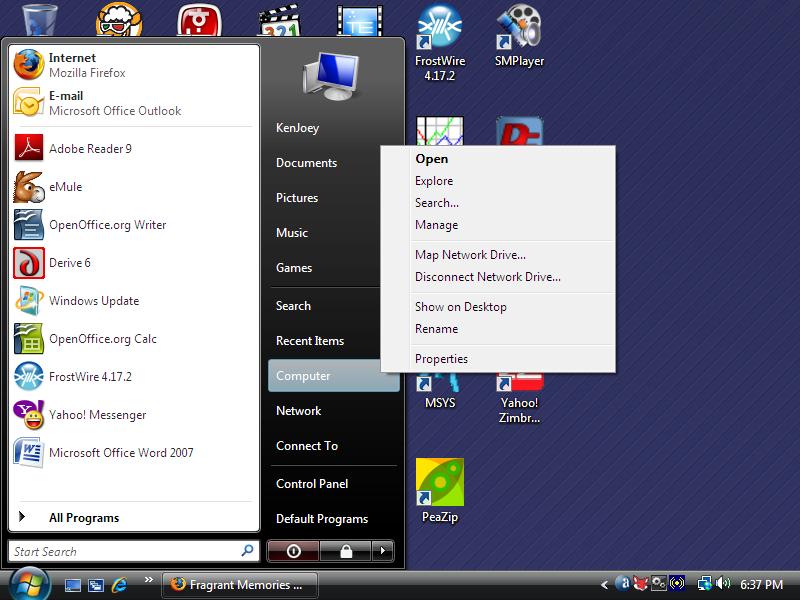
This section assumes that you're using Windows Vista. Open the Start menu, right-click on Computer and choose Properties.


Right-Click on Computer

Click on Advanced system settings on the left side of the window.


Vista_System_Properties

At the System Properties dialog, click on Environment Variables at the bottom. At the Environment Variables dialog, click on New. Create a new user variable, PATH as C:\Program Files\Common Files\GTK\bin;%PATH%:


Vista_Environment_Variables
Vista_New_User_Variable

Vista_LANG_variable


You can also define a variable LANG to localize your GTK applications, for example, fr_FR.UTF-8 for French.


Customizing GTK with .gtkrc-2.0


The default GTK look may not be appealing. To customize GTK look, we use GTK themes. When we compile GTK for Windows, we get two GTK theme engines, libpixmap.dll and libwimp.dll. We are going to use the Wimp theme engine, which best matches Windows look. Create a file .../etc/gtk-2.0/gtkrc for systemwide customizaiton with the following contents. Alternatively, create a file .gtkrc-2.0 in your personal folder, for example, C:\Users\Joe\.gtkrc-2.0 .


gtk-theme-name = "MS-Windows"

style "user-font"
{
font_name="Sans 9"
}
widget_class "*" style "user-font"

This assumes that you have the file libwimp.dll and also a theme directory at .../share/themes/MS-Windows . You can also specify other fonts, such as Serif 10 or Arial Bold Italic 10. Start a GTK application like Pidgin, GIMP or X-Chat and check if it looks good.


Compatibility with Pidgin


If you have compiled GTK on your own following my tutorial but Pidgin installer without GTK+ won't install because it can't find your GTK+, you can use PeaZip to manually extract files from the installer. Remember to move subfolders in $_OUTDIR to the Pidgin top folder. Then, create a shortcut on your Desktop pointing to C:\Program Files\Pidgin\pidgin.exe.


My GTK compilation will work with Pidgin if the following files are copied into the Pidgin directory:


iconv.dll

intl.dll

zlib1.dll

These files are easily found on the Internet (1).


Personalize Fontconfig and Pango


Now that GTK+ is working, you can further personalize it by tweaking Fontconfig and Pango. To fine-tune fontconfig, edit fonts.conf. To tweak Pango, create a file .pango.aliases in your personal folder and edit it.

Monday, June 8, 2009

Compiling Mencoder for Windows

Mencoder is a command-line tool for creating multimedia files. It allows you to convert video from one format to another. When used together with OGMRip, mencoder helps you to rip DVD into a video file that's convenient to watch on computers. Note that the instruction herein explains how to compile Mencoder for the Windows platform, not Linux.


MinGW must be installed first (Look here for how). Once you have MinGW, launch MSYS (rxvt) from the Start menu and type the following commands.


  1. PNG and JPEG


    PNG depends on zlib compression library. Download the zlib source from zlib.net and compile as follows:

    tar xzvf zlib-1.2.3.tar.gz
    cd zlib-1.2.3
    ./configure --prefix=/mingw
    make
    make install

    Now get the PNG library here and compile it as follows:

    tar xzvf libpng-1.2.34.tar.gz
    cd libpng-1.2.34/
    ./configure --prefix=/mingw --disable-shared
    make
    make install

    Download the source for JPEG library, compile and install JPEG as follows:

    tar xzvf jpegsrc.v7.tar.gz
    cd jpeg-7
    ./configure --prefix=/mingw
    make
    make install


  2. libdca Library


    Download the libdca source from videolan.org and compile it like this:


    tar xjvf libdca-0.0.5.tar.bz2
    cd libdca-0.0.5
    ./configure --prefix=/mingw
    make
    make install


  3. OGG, Vorbis and Theora


    The source for these libraries can be obtained from xiph.org. Compile them like this:

    ./configure --prefix=/mingw --disable-shared
    make
    make install


  4. Libcdio Library


    Download the libcdio source from here. Compile and install libcdio as follows:

    tar xzvf libcdio-0.81.tar.gz
    cd libcdio-0.81
    ./configure --prefix=/mingw --disable-shared
    make
    make install


  5. Live555 library


    The Live555 library is used to decode streaming media. Get the live555 source from here and compile it as follows:

    cd /mingw/lib
    tar xzvf live.2009.07.28.tar.gz
    cd live
    ./genMakefiles mingw
    make


  6. LAME


    LAME is an MP3 encoder. This library allows Mencoder to encode DVD sound into MP3 audio. Download LAME from lame.sf.net and compile it as follows.


    ./configure --prefix=/mingw --enable-expopt=full

    make

    make install


  7. TwoLame


    TwoLAME is an MP2 audio encoder. Get the source from twolame.org and compile it:

    ./configure --prefix=/mingw CPPFLAGS='-DLIBTWOLAME_STATIC'
    make
    make install


  8. XviD


    In case you didn't know, XviD is the most popular video encoder used in creating movie files found on the P2P networks. With this library, mencoder can rip a DVD into XviD video. Get the XviD source from xvid.org and compile as follows:


    tar xzvf xvidcore-1.2.2.tar.gz

    cd xvidcore/build/generic

    ./configure --prefix=/mingw

    make

    make install

    In addition, change to the /mingw/bin directory and copy xvidcore.a to libxvidcore.a.


    cd /mingw/lib

    cp xvidcore.a libxvidcore.a


  9. FAAC


    FAAC is an MPEG-4 AAC audio encoder. Get the source (faac-1.28.tar.gz) and unpack the package. Then, edit Makefile.am:

    SUBDIRS = include libfaac

    Also, edit the line beginning with AC_OUTPUT in the file configure.in:

    AC_OUTPUT(libfaac/Makefile include/Makefile Makefile)

    Then, compile FAAC like this

    sh bootstrap
    ./configure --prefix=/mingw --enable-static --disable-shared
    make
    make install


  10. x264


    x264 is yet another good video encoder. x264 requires YASM to build an optimized executable. So get yasm and save it as /mingw/bin/yasm.exe. Then, compile x264 like this:


    sh configure --prefix=/mingw --extra-cflags="-DX264_VERSION=20090608"

    make

    make install


  11. Compiling Mencoder


    Now you're ready to compile mencoder. Download the MPlayer source snapshot from mplayerhq.hu and unpack it. Then, type the following commands into the MSYS window to produce the executable mencoder.exe.


    CPPFLAGS='-DHAVE_INT32_T -DLIBTWOLAME_STATIC'./configure --prefix=/mingw --enable-runtime-cpudetection --enable-static --enable-theora --yasm=/mingw/bin/yasm

    make mencoder

    strip *.exe

    mv -iv mencoder.exe /c/Windows

    This produces a static executable mencoder.exe and copies it into the C:\WINDOWS folder.


If you'd like to try my mencoder build, download it from here. Its filename is MPlayer-svn-r30521-snapshot-3.4.5.zip.

Saturday, June 6, 2009

To Convert a FAT16 partition to FAT32 in Windows 98/ME

To convert a FAT16 partition to FAT32 in Windows 98/ME, you need to reboot with the emergency book floppy created by Windows. To create a boot floppy:


  1. Open the Start menu, open the Settings submenu and click the Control Panel.
  2. Click Add/Remove Programs.
  3. Select the Boot Disk tab in the pop-up window, and choose Create.
  4. Insert a blank floppy into your floppy drive and let Windows do the job.
  5. Then reboot your PC.


Once you're in DOS, change to C:\Windows\Command. Run CVT.EXE which will convert your FAT16 drive to FAT32.


C:

CD \WINDOWS\COMMAND

CVT C:

Friday, June 5, 2009

Building gtk-gnutella for Windows

I built gtk-gnutella for the Windows platform using MinGW. gtk-gnutella is an application that allows you to share files in the gnutella P2P network. Here I show how I built GTK-gnutella step-by-step:


  1. Install MinGW


    First of all, I installed MinGW. GCC 4.4 and higher versions are recommended.


  2. Compile Pthread and Regex (Optional)


    Build pthread and regex as shown in the following posts.


  3. Build GTK+ Library


    Follow the instruction in the following post to compile the whole GTK+ library.


  4. Build GnuTLS (Optional)


    I think GnuTLS is optional but it provides secure communication between gnutella clients. I chose to build GTK-gnutella with gnuTLS features. So I compiled GnuTLS as shown in this post.


  5. Unpack the Source


    Then, I downloaded the gtk-gnutella source and unpacked it in my HOME directory.


    cd $HOME

    tar xjvf gtk-gnutella-0.96.6.tar.bz2

    cd gtk-gnutella-0.96.6


  6. Run the Configure script


    Then, I ran ./Configure. For convenience, I am providing here my config.sh file generated by the Configure script. You can copy this file to your source tree before running the Configure script.


    #!/bin/sh
    #
    # This file was produced by running the Configure script. It holds all the
    # definitions figured out by Configure. Should you modify one of these values,
    # do not forget to propagate your changes by running "Configure -der". You may
    # instead choose to run each of the .SH files by yourself, or "Configure -S".
    #

    # Package name : gtk-gnutella
    # Source directory : .
    # Configuration time: Wed Aug 15 14:50:53 HST 2012
    # Configured by : Ken
    # Target system : mingw32_nt-6.1 a7n8x 1.0.17(0.4832) 2011-04-24 23:39 i686 msys

    : Configure command line arguments.
    config_arg0='./Configure'
    config_args=''
    config_argc=0

    Author=''
    Date=''
    Header=''
    Id='$Id'
    Locker=''
    Log=''
    RCSfile=''
    Revision=''
    Source=''
    State=''
    _a='.a'
    _exe='.exe'
    _o='.o'
    afs='false'
    afsroot='/afs'
    alignbytes='8'
    aphostname=''
    ar='/mingw/bin/ar'
    archlib='/mingw/lib/gtk-gnutella'
    archlibexp='/mingw/lib/gtk-gnutella'
    archname='i686-mingw'
    archobjs=''
    awk='/bin/awk'
    bash=''
    bin='/mingw/bin'
    binexp='/mingw/bin'
    bison='/bin/bison'
    byacc='byacc'
    byteorder='1234'
    c=''
    cat='/bin/cat'
    cc='/mingw/bin/gcc.exe'
    ccflags='-march=pentium2 -mtune=i586 -pipe -Wall -Wshadow -DMINGW32 -D_POSIX'
    ccname='gcc'
    ccversion=''
    cf_by='Ken'
    cf_time='Wed Aug 15 14:50:53 HST 2012'
    charsize='1'
    chgrp='/bin/chgrp'
    chmod='/bin/chmod'
    chown='/bin/chown'
    clocktype='int'
    comm=''
    compress=''
    contains='grep'
    cp='/bin/cp'
    cpio=''
    cpp='/mingw/bin/cpp'
    cpp_quote=''
    cpp_stuff='42'
    cppfilter=''
    cppflags='-march=pentium2 -mtune=i586 -pipe -Wall -Wshadow -DMINGW32 -D_POSIX'
    cpplast='-'
    cppminus='-'
    cpprun='/mingw/bin/gcc.exe -E'
    cppstdin='/mingw/bin/gcc.exe -E'
    csh=''
    d_access='define'
    d_alarm='undef'
    d_arc4random='undef'
    d_archlib='define'
    d_attribut='define'
    d_backtrace='undef'
    d_bcmp='undef'
    d_bcopy='undef'
    d_bfd_lib='undef'
    d_bindtxtcode='define'
    d_bsd='undef'
    d_built_clz='define'
    d_built_ctz='define'
    d_built_popcount='define'
    d_bzero='undef'
    d_can64='define'
    d_closefrom='undef'
    d_const='define'
    d_dbus='undef'
    d_deflate='define'
    d_dev_poll='undef'
    d_dirent_d_type='undef'
    d_dirnamlen=''
    d_dladdr='undef'
    d_dos='undef'
    d_enablenls='define'
    d_end_symbol='define'
    d_eofnblk='define'
    d_epoll='undef'
    d_etext_symbol='undef'
    d_eunice='undef'
    d_fast_assert='undef'
    d_fork='undef'
    d_ftime='undef'
    d_getaddrinfo='define'
    d_geteuid='undef'
    d_gethname='undef'
    d_getifaddrs='undef'
    d_getinvent='undef'
    d_getlogin='undef'
    d_getppid='undef'
    d_gettblsz='define'
    d_gettext='define'
    d_gettimeod='define'
    d_getuid='undef'
    d_glib='define'
    d_gnulibc='undef'
    d_gnutls='define'
    d_gtk='define'
    d_headless='undef'
    d_herror='undef'
    d_hstrerror='undef'
    d_iconv='define'
    d_ieee754='define'
    d_ilp32='define'
    d_ilp64='undef'
    d_index='undef'
    d_inflate='define'
    d_iptos='undef'
    d_ipv6='define'
    d_isascii='define'
    d_kevent_int_udata='undef'
    d_kqueue='undef'
    d_linux='undef'
    d_locale_charset='undef'
    d_lp64='undef'
    d_lstat='undef'
    d_madvise='undef'
    d_memalign='undef'
    d_memcpy='define'
    d_memmove='define'
    d_mempcpy='undef'
    d_mmap='undef'
    d_msghdr_msg_flags='undef'
    d_nanosleep='undef'
    d_nls='define'
    d_official='define'
    d_open3='define'
    d_os2='undef'
    d_pause='undef'
    d_phostname='undef'
    d_poll='undef'
    d_popen='define'
    d_portable='undef'
    d_posix_fadvise='undef'
    d_posix_memalign='undef'
    d_pread='undef'
    d_preadv='undef'
    d_pwage='undef'
    d_pwchange='undef'
    d_pwclass='undef'
    d_pwcomment='undef'
    d_pwexpire='undef'
    d_pwquota='undef'
    d_pwrite='undef'
    d_pwritev='undef'
    d_recvmsg='undef'
    d_regcomp='define'
    d_regparm='define'
    d_remotectrl='undef'
    d_rusage='undef'
    d_sbrk='undef'
    d_sched_yield='undef'
    d_select='define'
    d_sendfile='undef'
    d_setproctitle='undef'
    d_setsid='undef'
    d_sigaction='undef'
    d_sigprocmask='undef'
    d_sigsetjmp='undef'
    d_sockaddr_in_sin_len='undef'
    d_sockaddr_un='undef'
    d_socker_get='undef'
    d_statfs='undef'
    d_statvfs='undef'
    d_strchr='define'
    d_strlcat='undef'
    d_strlcpy='undef'
    d_sync_atomic='define'
    d_sysctl='undef'
    d_system='define'
    d_times='undef'
    d_ttyname='undef'
    d_uctx_mctx='undef'
    d_uctx_mctx_gregs='undef'
    d_uname='undef'
    d_useglib1='undef'
    d_useglib2='define'
    d_usegtk1='undef'
    d_usegtk2='define'
    d_usleep='define'
    d_voidsig='define'
    d_volatile='define'
    d_vsnprintf='define'
    d_waitpid='undef'
    d_windows='define'
    d_xenix='undef'
    date='/bin/date'
    dbuscflags=''
    dbusconfig='false'
    dbusldflags=''
    defvoidused='15'
    direntrytype=''
    eagain='EAGAIN'
    ebcdic='undef'
    echo='/bin/echo'
    egrep='/bin/egrep'
    emacs=''
    enablenls='true'
    eunicefix=':'
    expr='/bin/expr'
    fieldn='3'
    find=''
    firstmakefile=''
    flex=''
    from=':'
    gcc=''
    gccosandvers=''
    gccversion='4'
    glade='glade-2'
    glibcflags='-mms-bitfields -I/mingw/include/glib-2.0 -I/mingw/lib/glib-2.0/include -I/mingw/include'
    glibconfig='pkg-config glib-2.0 gobject-2.0'
    glibldflags='-L/mingw/lib -lgobject-2.0 -lgthread-2.0 -lglib-2.0 -lintl '
    glibpackage='glib-2.0 gobject-2.0'
    glibpth='/mingw/lib'
    glibversion='2'
    gmake=''
    gmsgfmt='/mingw/bin/msgfmt'
    gnulibc_version=''
    gnutlscflags=''
    gnutlsconfig='pkg-config gnutls'
    gnutlsldflags='-L/mingw/lib -lgnutls'
    grep='/bin/grep'
    groupcat=':'
    gtkcflags='-mms-bitfields -I/mingw/include/gtk-2.0 -I/mingw/lib/gtk-2.0/include -I/mingw/include/atk-1.0 -I/mingw/include/cairo -I/mingw/include/gdk-pixbuf-2.0 -I/mingw/include/pango-1.0 -I/mingw/include/glib-2.0 -I/mingw/lib/glib-2.0/include -I/mingw/include -I/mingw/include/pixman-1 -I/mingw/include/libpng15'
    gtkconfig='pkg-config gtk+-2.0'
    gtkgversion='0.98.3'
    gtkldflags='-Wl,-luuid -L/mingw/lib -lgtk-win32-2.0 -lgdk-win32-2.0 -limm32 -lshell32 -lole32 -latk-1.0 -lpangocairo-1.0 -lgio-2.0 -lgdk_pixbuf-2.0 -lpangowin32-1.0 -lgdi32 -lpango-1.0 -lcairo -lgobject-2.0 -lgmodule-2.0 -lgthread-2.0 -lglib-2.0 -lintl'
    gtkpackage='gtk+-2.0'
    gtkversion='2'
    gzip=''
    h_fcntl='false'
    h_sysfile='true'
    hint='previous'
    hostcat=':'
    huge=''
    i_alloca='undef'
    i_arpainet='undef'
    i_dirent='define'
    i_dlfcn='undef'
    i_execinfo='undef'
    i_fcntl='undef'
    i_iconv='define'
    i_ifaddrs='undef'
    i_inttypes='define'
    i_invent='undef'
    i_langinfo='undef'
    i_libcharset='define'
    i_libintl='define'
    i_limits='define'
    i_linux_netlink='undef'
    i_linux_rtnetlink='undef'
    i_malloc='define'
    i_math='define'
    i_mswsock='define'
    i_netdb='undef'
    i_netif='undef'
    i_netroute='undef'
    i_niin='undef'
    i_niip='undef'
    i_poll='undef'
    i_pthread='define'
    i_pwd='undef'
    i_regex='define'
    i_sched='define'
    i_stdarg='define'
    i_stdlib='define'
    i_string='define'
    i_sysfile='define'
    i_sysin='undef'
    i_sysmman='undef'
    i_sysmount='undef'
    i_sysparam='define'
    i_syspoll='undef'
    i_sysresrc='undef'
    i_sysselct='undef'
    i_syssendfile='undef'
    i_syssock='undef'
    i_sysstat='define'
    i_sysstatvfs='undef'
    i_syssysctl='undef'
    i_systime='define'
    i_systimeb='define'
    i_systimek='undef'
    i_systimes='undef'
    i_systypes='define'
    i_sysun='undef'
    i_sysutsname='undef'
    i_sysvfs='undef'
    i_syswait='undef'
    i_time='undef'
    i_ucontext='undef'
    i_unistd='define'
    i_varargs='undef'
    i_varhdr='stdarg.h'
    i_winsock2='define'
    i_ws2tcpip='define'
    i_zlib='define'
    ieee754_byteorder='1234'
    ilp='32'
    incpath=''
    inews=''
    install='/bin/install.exe'
    installarchlib='/mingw/lib/gtk-gnutella'
    installbin='/mingw/bin'
    installdir='mkdir -p'
    installmansrc=''
    installprivlib='/mingw/lib/gtk-gnutella'
    intsize='4'
    issymlink=''
    ksh=''
    large=''
    ldflags='-Wl,--enable-auto-image-base -Wl,--enable-auto-import -Wl,--enable-runtime-pseudo-reloc'
    less=''
    libc=''
    libnames=''
    libpth='/mingw/lib'
    libs='-liberty -lws2_32 -lpthread -lregex -lz -lintl -liconv -limagehlp -liphlpapi -lpowrprof -lpsapi -lkernel32'
    libscheck=''
    libsdirs=' /mingw/lib'
    libsfiles=' libbfd.a libm.a'
    libsfound=' /mingw/lib/libbfd.a /mingw/lib/libm.a'
    libspath=' /mingw/lib /mingw/lib'
    libswanted='bfd iberty sendfile z resolv iconv m intl dl'
    line=''
    lint=''
    lkflags=''
    ln='/bin/ln'
    lns='ln -s'
    locale='/mingw/share/locale'
    localeexp='/mingw/share/locale'
    locincpth=''
    loclibpth=''
    longsize='4'
    lp=''
    lpr=''
    ls=''
    mail=''
    mailx=''
    make='/bin/make'
    make_set_make='#'
    manext='0'
    mansrc=' '
    mansrcexp=''
    medium=''
    mips_type=''
    mkdep='/c/Users/Ken/Downloads/gtk-gnutella-0.98.3/mkdep'
    mkdir='/bin/mkdir'
    models='none'
    more=''
    msgfmt='/mingw/bin/msgfmt'
    msgmerge='/mingw/bin/msgmerge'
    msgmerge_update='/mingw/bin/msgmerge --update'
    mv='/bin/mv'
    myarchname='i686-mingw'
    mydomain=''
    myhostname='lenovo-a8nvm'
    myuname='mingw32_nt-6.1 a7n8x 1.0.17(0.4832) 2011-04-24 23:39 i686 msys '
    n='-n'
    nawk='/bin/nawk'
    nm='/mingw/bin/nm'
    nm_opt=''
    nm_so_opt=''
    nofile=''
    nroff='nroff'
    o_nonblock=''
    official='true'
    optimize='-O2 -g0'
    orderlib='false'
    osname='mingw'
    osvers='1.0.17'
    package='gtk-gnutella'
    passcat=':'
    perl=''
    pg=''
    phostname='hostname'
    pkgsrc='/home/Ken/Downloads/gtk-gnutella-0.98.3'
    plibpth=''
    pmake=''
    pr=''
    prefix='/mingw'
    prefixexp='/mingw'
    privlib='/mingw/lib/gtk-gnutella'
    privlibexp='/mingw/lib/gtk-gnutella'
    prototype='define'
    ptrsize='4'
    ranlib=':'
    rd_nodata=''
    remotectrl='false'
    rm='/bin/rm'
    rmail=''
    run=''
    runnm='false'
    sed='/bin/sed'
    sendmail=''
    sh='/bin/sh'
    shar=''
    sharpbang='#!'
    shortsize='2'
    shsharp='true'
    sig_count='23'
    sig_name='ZERO NUM1 INT NUM3 ILL NUM5 NUM6 NUM7 FPE NUM9 NUM10 SEGV NUM12 NUM13 NUM14 TERM NUM16 NUM17 NUM18 NUM19 NUM20 BREAK ABRT '
    sig_name_init='"ZERO", "NUM1", "INT", "NUM3", "ILL", "NUM5", "NUM6", "NUM7", "FPE", "NUM9", "NUM10", "SEGV", "NUM12", "NUM13", "NUM14", "TERM", "NUM16", "NUM17", "NUM18", "NUM19", "NUM20", "BREAK", "ABRT", 0'
    sig_num='0 1 2 3 4 5 6 7 8 9 10 11 12 13 14 15 16 17 18 19 20 21 22 '
    sig_num_init='0, 1, 2, 3, 4, 5, 6, 7, 8, 9, 10, 11, 12, 13, 14, 15, 16, 17, 18, 19, 20, 21, 22, 0'
    sig_size='23'
    signal_t='void'
    sleep=''
    smail=''
    small=''
    so='dll'
    sockercflags=''
    sockerldflags=''
    sort='/bin/sort'
    spackage='Gtk-gnutella'
    spitshell='cat'
    split=''
    src='.'
    startsh='#!/bin/sh'
    strings='/mingw/include/string.h'
    submit=''
    sysman='/mingw/share/man'
    tablesize='NOFILE'
    tail=''
    tar=''
    targetarch=''
    tbl=''
    tee=''
    test='test'
    timeincl='/mingw/include/sys/time.h '
    to=':'
    touch='/bin/touch'
    tr='/bin/tr'
    trnl='\n'
    troff=''
    uname='/bin/uname'
    uniq='/bin/uniq'
    usecrosscompile='undef'
    usenm='false'
    usrinc='/mingw/include'
    uuname=''
    vi=''
    voidflags='15'
    wc='/bin/wc'
    xgettext='/mingw/bin/xgettext'
    xlibpth='/mingw/lib'
    yacc='bison -y'
    yaccflags=''
    zcat=''
    zip=''
    CONFIG=true

    Alternatively, if your config.sh needs no modification, just run the following commands.


    ./Configure -S
    make depend


  7. Before running make, open src/Makefile and insert -mwindows into the gtk-gnutella section:

  8. gtk-gnutella:  $(OBJ) $(EXTRA)
    $(RM) $@
    if test -f $@$(_EXE); then \
    $(MV) $@$(_EXE) $@~$(_EXE); fi
    $(CC) -o $@ $(OBJ) $(EXTRA) -mwindows $(JLDFLAGS) $(LIBS)

    This prevents GTK-gnutella from outputting error logs to a black console window.


  9. Then, I compiled gtk-gnutella with the following commands:


    make

    make install


gtk-gnutella_winnt

VNC4 vs TightVNC

A frequent question people have when setting up and using VNC is what differences are there between VNC4 and TightVNC. These differences are summarized in the table below.


VNC4 TightVNC
Developer RealVNC Limited TightVNC.com
License Only free edition is open-source Open-source
Platfrom Windows, Linux Windows, Linux
Installed Size 4648 KB 1432 KB
Linux Dependencies libsm6, libstdc++6, libxext6, zlib1g libxext6, libjpeg62, zlib1g
Supported Encodings ZRLE, Hextile, Raw copyrect, tight, hextile, zlib, corre, rre, raw
Inetd supported mode Wait, Nowait Nowait
Shared Sessions from Inetd Shared, Non-shared Non-shared

Thursday, June 4, 2009

Building FAAC, XviD, GPAC and OGMRip


After building MPlayer and Mencoder for Linux, the last fun part is to build OGMRip so that we can rip movies into AVI or MP4 files as found on the P2P networks. OGMRip is a graphical movie convertor that uses MPlayer and Mencoder to convert a movie into another format.


Building FAAC


First, let's compile FAAC as it is needed to encode AAC audio. You need a g++ compiler, autoconf, automake and tcl-dev to compile FAAC, following a typical procedure:


./bootstrap
./configure --build=i586-pc-linux-gnu --prefix=/usr --with-mp4v2
make
make install

The bootstrap command produces the configure script and Makefile necessary for the build procedure. The following set of files are generated upon compilation of FAAC:


/usr/bin/faac
/usr/include/faac.h
/usr/include/faaccfg.h
/usr/lib/libfaac.a
/usr/lib/libfaac.la
/usr/lib/libfaac.so
/usr/lib/libfaac.so.0
/usr/lib/libfaac.so.0.0.0
/usr/man/man1/faac.1.gz


Building XviD library


Now, let's build the XviD library. XviD is a popular video codec. A typical build procedure for XviD looks like this:


tar xzf xvidcore-1.2.2.tar.gz
cd xvidcore/build/generic
./configure --build=i586-pc-linux-gnu --prefix=/usr
make
make install

Upon successful compilation, the following set of files are installed on system.


/usr/lib/libxvidcore.a
/usr/include/xvid.h
/usr/lib/libxvidcore.so
/usr/lib/libxvidcore.so.4
/usr/lib/libxvidcore.so.4.1


Building GPAC


Next, let's compile GPAC which is an open-source MPEG-4 encoder. Before compiling GPAC, install the following developer libraries, most of which are optional:


liba52-0.7.4-dev
libasound2-dev
libavformat-dev
libfaad-dev
libmad0-dev
libmozjs-dev
libogg-dev
libopenjpeg-dev
libssl-dev
libtheora-dev
libvorbis-dev
libwxgtk2.8-0
libxvidcore4

Then, compile GPAC as follows:


./configure --prefix=/usr/local --cpu=i586 --enable-pic --strip --use-ffmpeg=local --use-js=local

make

make install

When GPAC is compiled and installed successfully, the following set of files are generated on the system:


/usr/bin/MP4Box
/usr/bin/MP4Client
/usr/bin/Osmo4
/usr/lib/gpac/gm_aac_in.so
/usr/lib/gpac/gm_ac3_in.so
/usr/lib/gpac/gm_alsa.so
/usr/lib/gpac/gm_bifs_dec.so
/usr/lib/gpac/gm_ctx_load.so
/usr/lib/gpac/gm_dummy_in.so
/usr/lib/gpac/gm_ffmpeg_in.so
/usr/lib/gpac/gm_ft_font.so
/usr/lib/gpac/gm_gpac_js.so
/usr/lib/gpac/gm_img_in.so
/usr/lib/gpac/gm_ismacryp.so
/usr/lib/gpac/gm_isom_in.so
/usr/lib/gpac/gm_laser_dec.so
/usr/lib/gpac/gm_mp3_in.so
/usr/lib/gpac/gm_mpegts_in.so
/usr/lib/gpac/gm_odf_dec.so
/usr/lib/gpac/gm_ogg_xiph.so
/usr/lib/gpac/gm_oss_audio.so
/usr/lib/gpac/gm_raw_out.so
/usr/lib/gpac/gm_rtp_in.so
/usr/lib/gpac/gm_saf_in.so
/usr/lib/gpac/gm_soft_raster.so
/usr/lib/gpac/gm_svg_in.so
/usr/lib/gpac/gm_timedtext.so
/usr/lib/gpac/gm_x11_out.so
/usr/lib/gpac/gm_xvid_dec.so
/usr/lib/libgpac-0.4.5.so
/usr/lib/libgpac.so
/usr/man/man1/gpac.1.gz
/usr/man/man1/mp4box.1.gz
/usr/man/man1/mp4client.1.gz
/usr/share/gpac/gpac.mp4

If you encounter the following error during compilation:


scenegraph/vrml_smjs.c:41:20: error: jsapi.h: No such file or directory

make symlinks to jsapi.h and compile again as follows:


cd include/

ln -s ../extra_lib/include/js/* .

cd ..

./configure --prefix=/usr --cpu=i586 --enable-pic --strip --use-ffmpeg=local --use-js=local --extra-cflags=-DXP_UNIX

make

make install

Some programs require the gpac static library libgpac_static.a. This file is not installed by default. However, you can copy it manually:


cp bin/gcc/libgpac_static.a usr/lib


Building OGMRip


Finally, let's build OGMRip. First, make sure you have the following developer libraries:


libdbus-glib-1-dev
libdvdread-dev
libenca-dev
libenchant-dev
libgconf2-dev
libglade2-dev
libgtk2.0-dev
libhal-dev
libnotify-dev
libstdc++6-4.4-dev
libtheora-dev

Optionally, install intltool, gtk-doc and xsltproc for internationalization and documentation. Then, build OGMRip as follows:


./configure --prefix=/usr/local --build=i586-pc-linux-gnu --sysconfdir=/etc --enable-gtk-doc --with-ocr=auto

make

make install

After OGMRip is compiled and installed successfully, the following set of files are generated on system:


/etc/gconf/schemas/ogmrip.schemas
/usr/bin/avibox
/usr/bin/dvdcpy
/usr/bin/ogmrip
/usr/bin/subp2pgm
/usr/bin/subp2png
/usr/bin/subp2tiff
/usr/bin/subptools
/usr/bin/theoraenc
/usr/include/ogmdvd/
/usr/include/ogmjob/
/usr/include/ogmrip/
/usr/lib/libogmdvd-gtk.a
/usr/lib/libogmdvd-gtk.la
/usr/lib/libogmdvd-gtk.so
/usr/lib/libogmdvd-gtk.so.0
/usr/lib/libogmdvd-gtk.so.0.0.0
/usr/lib/libogmdvd.a
/usr/lib/libogmdvd.la
/usr/lib/libogmdvd.so
/usr/lib/libogmdvd.so.0
/usr/lib/libogmdvd.so.0.0.0
/usr/lib/libogmjob.a
/usr/lib/libogmjob.la
/usr/lib/libogmjob.so
/usr/lib/libogmjob.so.0
/usr/lib/libogmjob.so.0.0.0
/usr/lib/libogmrip-gtk.a
/usr/lib/libogmrip-gtk.la
/usr/lib/libogmrip-gtk.so
/usr/lib/libogmrip-gtk.so.0
/usr/lib/libogmrip-gtk.so.0.0.0
/usr/lib/libogmrip-lavc.a
/usr/lib/libogmrip-lavc.la
/usr/lib/libogmrip-lavc.so
/usr/lib/libogmrip-lavc.so.0
/usr/lib/libogmrip-lavc.so.0.0.0
/usr/lib/libogmrip-mplayer.a
/usr/lib/libogmrip-mplayer.la
/usr/lib/libogmrip-mplayer.so
/usr/lib/libogmrip-mplayer.so.0
/usr/lib/libogmrip-mplayer.so.0.0.0
/usr/lib/libogmrip.a
/usr/lib/libogmrip.la
/usr/lib/libogmrip.so
/usr/lib/libogmrip.so.0
/usr/lib/libogmrip.so.0.0.0
/usr/lib/ogmrip/
/usr/lib/pkgconfig/ogmdvd-gtk.pc
/usr/lib/pkgconfig/ogmdvd.pc
/usr/lib/pkgconfig/ogmjob.pc
/usr/lib/pkgconfig/ogmrip-gtk.pc
/usr/lib/pkgconfig/ogmrip.pc
/usr/share/applications/ogmrip.desktop
/usr/share/doc/ogmrip/
/usr/share/gtk-doc/html/ogmdvd-gtk
/usr/share/gtk-doc/html/ogmdvd/
/usr/share/gtk-doc/html/ogmjob/
/usr/share/gtk-doc/html/ogmrip-gtk/
/usr/share/gtk-doc/html/ogmrip/
/usr/share/locale/ca/LC_MESSAGES/ogmrip.mo
/usr/share/locale/cs/LC_MESSAGES/ogmrip.mo
/usr/share/locale/de/LC_MESSAGES/ogmrip.mo
/usr/share/locale/fr/LC_MESSAGES/ogmrip.mo
/usr/share/locale/sv/LC_MESSAGES/ogmrip.mo
/usr/share/man/man1/avibox.1.gz
/usr/share/man/man1/dvdcpy.1.gz
/usr/share/man/man1/subp2pgm.1.gz
/usr/share/man/man1/subptools.1.gz
/usr/share/ogmrip/
/usr/share/pixmaps/ogmrip.png

Now that you've compiled OGMRip, go ahead and test it. Be sure that mplayer, mencoder, ogmtools, vorbis-tools, gpac, faac, lame, mkvtoolnix and gocr (or ocrad) are installed, also.


OGMRip Video Convertor Options

Wednesday, June 3, 2009

Compiling MLDonkey for Linux

MLDonkey is a multi-protocol P2P file-sharing program for Windows, Mac and Linux. Unlike eMule, MLDonkey supports Bittorrent, FastTrack and DirectConnect networks, too. Compiling MLDonkey requires OCaml compiler toolchain. First, download and install the following Ocaml stuff. These are names of required Debian packages:


ocaml-native-compilers

camlp4

ocaml-nox


Then, install these libraries:


zlib1g-dev

libbz-dev

libgd2-xpm-dev

libmagic-dev


Now, you are ready to compile MLDonkey. Change directory to the MLDonkey source tree and type these commands:


./configure --prefix=/usr --build=i586-pc-linux-gnu

make release.mlnet.static

You'll get a tarball, for example, mldonkey-3.0.0.static.i586-Linux_glibc-2.7.tar.bz2. Keep it at a safe place. Now, extract the tarball to a directory, for example, /opt. In the extracted folder, you'll find an executable, mlnet. This is just a command-line program, so you need a GUI frontend, such as Sancho.


Sancho GUI

Sunday, May 31, 2009

Manually Starting a VNC Server

Manually starting a VNC server is necessary for testing VNC. Once you got VNC to work correctly, you can copy the command line to a script or inetd.conf. First, I created an executable script ~/.vnc/xstartup with the following contents:


#!/bin/sh

exec /etc/X11/Xsession

This file has to be made executable, of course. Prior to starting vnc4server, make sure your X session can start normally by checking your ~/.xsession file. My .xsession file looks like this:


#!/bin/sh

exec openbox

Then, I started vnc4server:


vnc4server -geometry 800x600 -depth 16 -name VNC4

The first time you run vnc4server, it will ask you for the password. Create a password that only you can guess and memorize it. Next, I installed TightVNC U3 package on my Sandisk U3 flash. I went over to another PC running Windows and plugged in my USB flash. The U3 menu popped up and I clicked on the TightVNC icon. Then, I specified the address of my Linux box running vnc4server:


192.168.1.234:1 or

192.168.1.234::5901

After I was done with vnc session, I killed the vnc4server with the following command:


vnc4server -kill :1

When vnc sessions don't seem working, check the log file: ~/.vnc/*.log


Related Posts


Connecting to a VNC Server through a SSH Tunnel

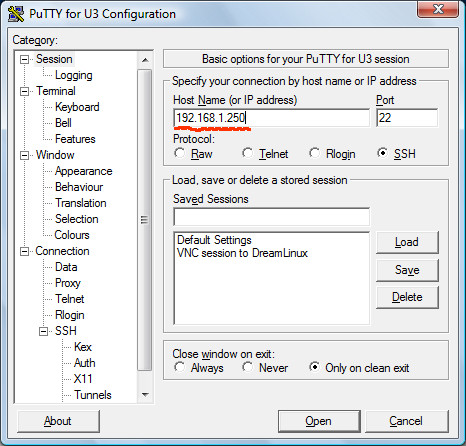
For security and privacy, VNC connection should be done through a SSH tunnel. Here, I am using Putty to set up a SSH Tunnel. First, type in the host name:


Putty_Setup_1003

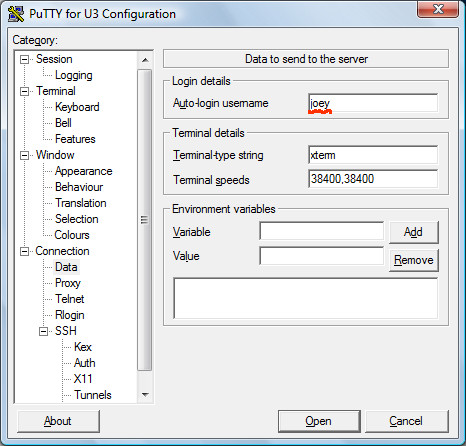
Next, type in the user name:


Putty_Setup_1010

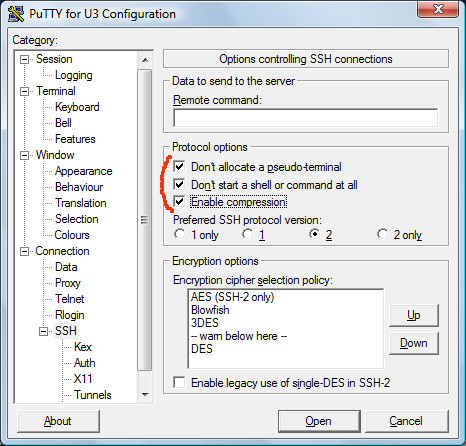
Check the following options. Also, move Blowfish up for speed:


Putty_Setup_1018

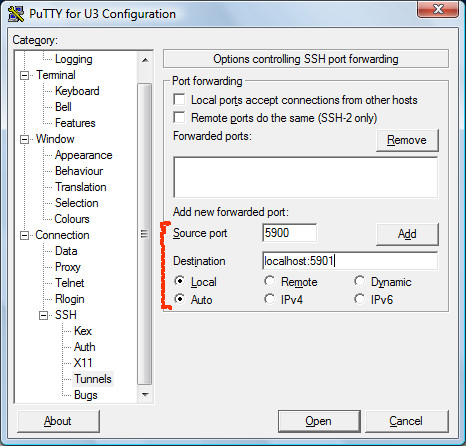
Set up a SSH tunnel. The Source port will be the local port through which the VNC viewer will connect. The destination port is the remote port whereby the VNC server listens. Click Add button:


Putty_Setup_1027

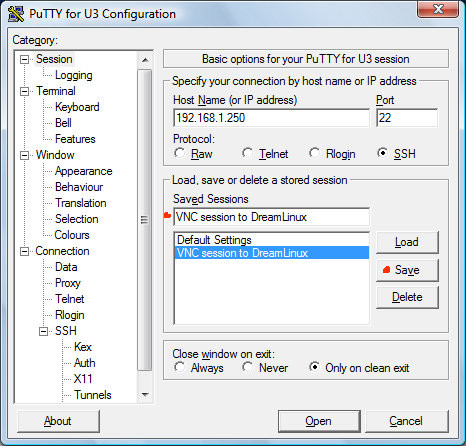
Save the Putty session.


Putty_Setup_1034

Now that you set up a SSH tunnel, you can use a VNC viewer like TightVNC to connect through the SSH tunnel to the remote VNC server. For example, specify localhost::5900 as the server host to TightVNC.


Related Posts


Saturday, May 30, 2009

Building Seamonkey in Linux

Seamonkey is yet another Web Browser with built-in email reader and address book. Formerly known as Mozilla Suite, Seamonkey is now abandoned by the Mozilla foundation in favor of Firefox and Thunderbird. However, Seamonkey is still being developed by a few people and is in a stable, useful state. Seamonkey is sometimes omitted from Linux distributions. If you want to use Seamonkey in such distros, you can either download a pre-compiled package or compile Seamonkey for yourself. Building Seamonkey in Linux is not as complicated as it may seem.


First, you need to install the necessary compiler tools and libraries:


  • g++
  • libgtk2.0-dev
  • libidl-dev
  • libjpeg62-dev
  • libpng12-dev
  • libxft-dev
  • libxt-dev
  • make
  • zip


Next, download and unpack the seamonkey source from here. In the top-level mozilla directory, create a file, named .mozconfig, with the following contents:


mk_add_options MOZ_CO_PROJECT=suite
mk_add_options MOZ_OBJDIR=@TOPSRCDIR@/obj-i586-pc-linux-gnu
ac_add_options --host=i586-pc-linux-gnu
ac_add_options --prefix=/usr
ac_add_options --enable-application=suite
ac_add_options --enable-default-toolkit=gtk2
ac_add_options --enable-xft
ac_add_options --enable-extensions=default,-irc
ac_add_options --with-system-jpeg
ac_add_options --with-system-zlib
ac_add_options --with-system-png
ac_add_options --disable-system-cairo
ac_add_options --enable-crypto
ac_add_options --enable-optimize=-O2
ac_add_options --enable-strip
ac_add_options --enable-safe-browsing
ac_add_options --enable-url-classifier
ac_add_options --disable-gnomevfs
ac_add_options --disable-gnomeui
ac_add_options --disable-installer
ac_add_options --disable-updater
ac_add_options --disable-tests
ac_add_options --disable-debug


Then, start the compilation:


make -f client.mk build

Once compilation finishes, make a tarball of the compiled binaries:


make -C objdir/xpinstall/packager

mv objdir/dists/seamonkey*.tar.gz $HOME

Finally, install Seamonkey:


make -f client.mk install

ln -s /usr/lib/seamonkey/seamonkey /usr/bin/seamonkey

Friday, May 22, 2009

Remote Desktop Session with VNC4Server & TightVNC

We are in a computing era in which we run applications from a remote computer or server. There are many ways for us to have remote desktop sessions. RDP, NX and VNC all are protocols designed to implement remote desktops. Of those, VNC is the most used and supported. This post is about many ways of setting up and using VNC in Linux and Windows. Below I explain how I set up a VNC remote session between my Linux box and a TightVNC viewer running on a Windows PC.


Setting up Inetd to start VNC on Incoming Connections


First, I installed vnc4server on my Debian Linux box. Alternatively, I could install tightvncserver instead. TightVNC is lighter than vnc4server. Anyway, to have inetd automatically start a VNC server on incoming connections, I added the following line to my /etc/inetd.conf file. This is all one line:


5995 stream tcp,rcvbuf=64k,sndbuf=256k wait nobody:nogroup /usr/bin/Xvnc Xvnc -inetd -query localhost -once -geometry 960x600 -depth 16 -AlwaysShared -rfbauth /etc/vnc/passwd -desktop myOffice -dpi 96 -fp /usr/share/fonts/X11/Type1 -co /etc/X11/rgb

For tightvncserver, the inetd.conf line would look slightly different because tightvncserver panics when wait is used instead of nowait. This means that tightvncserver sessions can never be shared when started from inetd:


5960 stream tcp,rcvbuf=64k,sndbuf=256k nowait nobody:nogroup /usr/bin/Xvnc Xvnc -inetd -query localhost -once -geometry 960x600 -depth 16 -desktop myOffice -dpi 96 -fp /usr/share/fonts/X11/Type1 -co /etc/X11/rgb

Typical port values are in the range from 5900 to 5999. Make sure everything in the following checklist is OK for VNC to work:


  • A display manager, such as gdm, kdm, xdm or wdm, must be running and set up to accept XDMCP requests. Read the sections below about setting up XDMCP for VNC sessions.
  • A VNC password must be created and stored in the readable file /etc/vnc/passwd. To create it, run:

    vncpasswd

    mkdir /etc/vnc

    mv ~/.vnc/passwd /etc/vnc

    chmod 644 /etc/vnc/passwd

  • At least, fixed and cursor fonts must be present in the default font paths. If not, specify the font paths with -fp parameter.

Tell inetd to reload settings in /etc/inetd.conf with the following command:


kill -1 $(pidof inetd)


Setting up GDM to handle VNC logins


It is rather simple to make GDM accept XDMCP requests from a VNC server. Open the file /etc/gdm/gdm.conf and add the following lines in the [XDMCP] section:


[xdmcp]

Enable=true

Port=177

DisplaysPerHost=8

The lines above enable GDM to accept logins at UDP port 177. Also, GDM is set up to accept up to 8 users from localhost. Otherwise, GDM may refuse remote logins through SSH tunnel when there are already a couple of users logged in at localhost.


For security, it is recommended to add the following line to /etc/hosts.deny:


gdm: ALL

Then, add the following line to /etc/hosts.allow:


gdm: 127.0.0.1


Setting up XDM for use with VNC


XDM is lighter than gdm or kdm, so XDM is ideal for VNC sessions where network bandwidth and CPU resource are precious. In fact, XDM can coexist with gdm or kdm. In Debian, set HEED_DEFAULT_DISPLAY_MANAGER to false in the script /etc/init.d/xdm:


[ -z "$HEED_DEFAULT_DISPLAY_MANAGER" ] && HEED_DEFAULT_DISPLAY_MANAGER=false

To set up XDM to handle VNC logins and deliver a user's desktop, XDMCP support has to be enabled first. Open the file /etc/X11/xdm/xdm-config and locate the following line:


DisplayManager.requestPort: 0

Change the number 0 to 177. Then, open the file /etc/X11/xdm/Xaccess and specify the range of addresses to allow access to XDM. Usually, it is sufficient to add only the following lines to /etc/X11/xdm/Xaccess:


localhost

127.0.0.1

Optionally, you can change the look of the login screen. Open the file /etc/X11/xdm/Xsetup and enter a command to set the background image:


#!/bin/sh

hsetroot -fill /usr/local/share/pixmaps/Repressed.jpg

You can also change the welcome line and the face image by editing the file /etc/X11/xdm/Xresources:


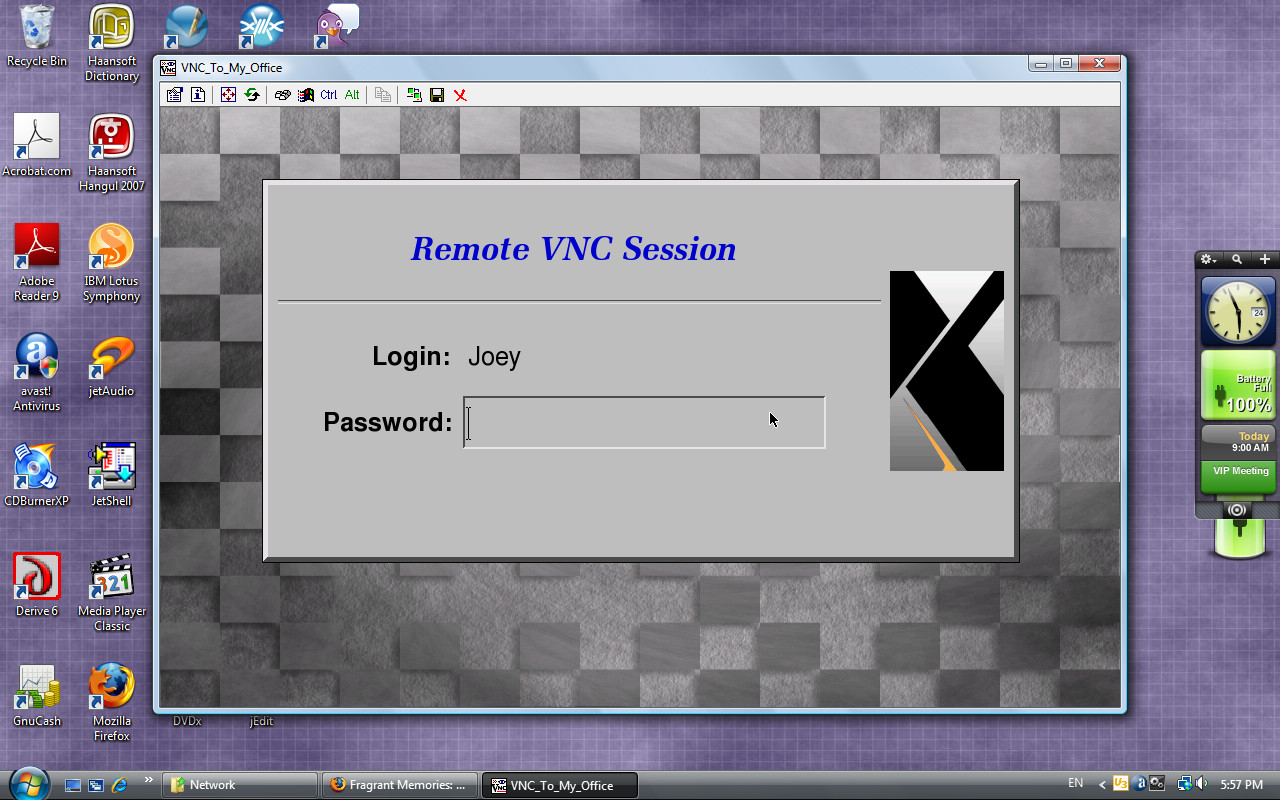
xlogin*greeting: Remote VNC Session

xlogin*logoFileName: /usr/share/X11/xdm/pixmaps/xorg.xpm


VNC_XDM_2

Using TightVNC in Windows to Run a Linux Destop


I installed TightVNC U3 package on my USB thumbdrive so I can connect to my VNC server anywhere. However, I had to tweak TightVNC a little bit to open a VNC session to my Linux desktop.


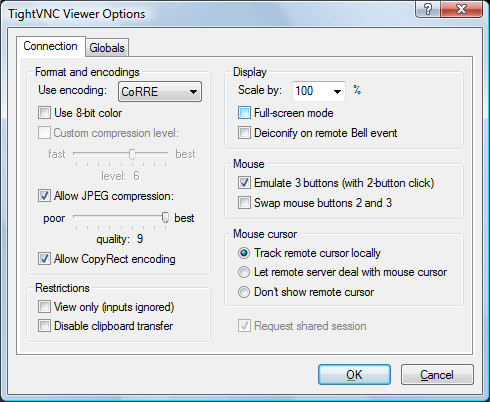
TightVNC_options

The default encoding Tight doesn't work well with vnc4server. So I had to change it to CoRRE.


Related Posts


Wednesday, May 20, 2009

OpenOffice.org on Portable USB drive

My favorite Office suite is OpenOffice.org which is free and fully functional alternative to Microsoft Office 2007. If you haven't tried it yet, I highly recommend OpenOffice.org to you.


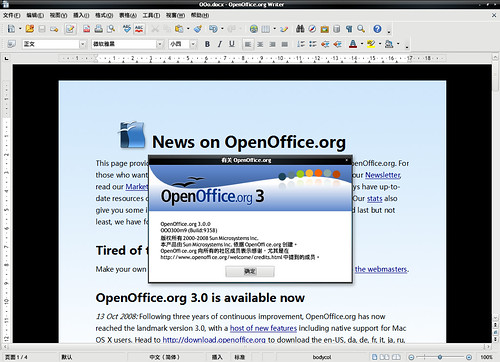
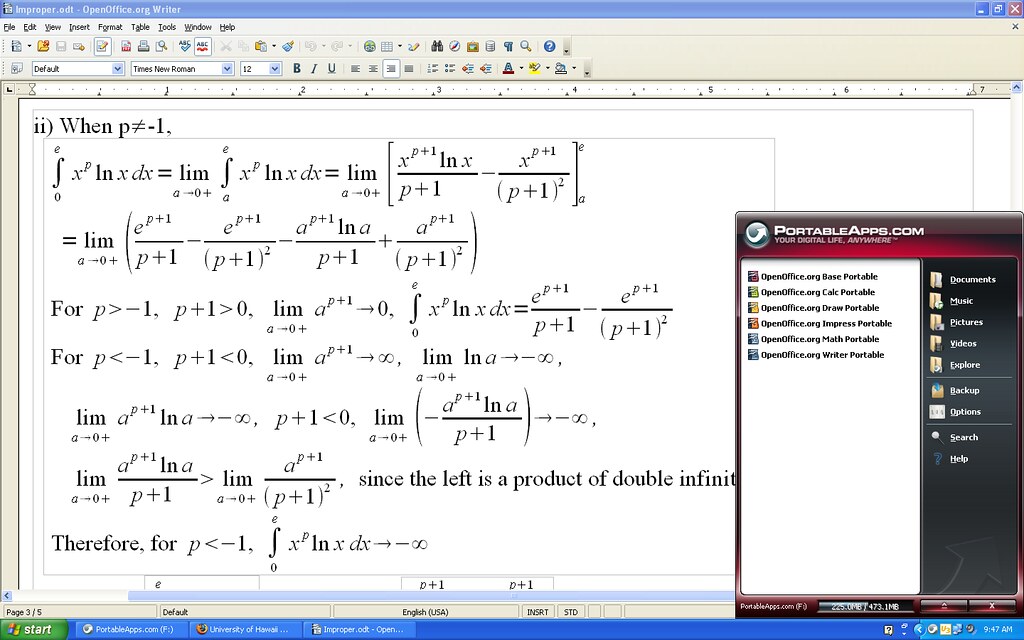
OpenOffice.org Portable 3.0.0 zh-CN by Sunny.x on Flickr

My 2GB MEMOREX USB by b3kool on FlickrHowever, OpenOffice.org is not widely available on computers in offices, cafe, schools and airports. In case you want to use OpenOffice.org on public computers without OpenOffice.org installed, you can install OpenOffice.org onto your USB flash drive beforehand, carry it with you wherever you go, and run OpenOffice.org from the USB thumbdrive. OpenOffice.org can be installed on USB thumbdrives of minimum 512 MB space. There are 2 portable releases of OpenOffice.org:


Math Improper Activity

Wednesday, May 6, 2009

Alexander and Baldwin Museum: Sugar Industry of Hawaii

The museum showcases many exhibits that illustrate the history of the sugar industry of Hawaii and the sugar industry’s impact on the Hawaiian culture. The sugar industry was a major industry in Hawaii since 1835 until 1960’s. It contributed greatly to economic development in Hawaii, laying out important infrastructures, such as water supplies, transportation and local financial groups like various factor agencies. The sugar industry also introduced various ethnic immigrants into Hawaii, making Hawaii such an ethnically diverse society today. The many ethnic groups from China, Japan, Philippines and Portuguese islands also brought their own unique culture with them, and these separate cultures intermingled to become a unique Hawaiian culture today.

The exhibits include the miniature model of the Maui island, the pictures of water tunnel construction, the drawing of Henry Baldwin’s courageous anecdote in Maliko gulch, artifacts of immigrant laborers, aerial picture of plantation camps, and various tools and machines used in the sugar mills.

The museum visit was a memorable experience for me whereby I saw the astonishing accomplishments by Samuel T. Alexander and Henry P. Baldwin, two local entrepreneurs of Hawaiian missionary ancestry. They started one of the largest industries in Hawaii, and their legacy remains one of the most powerful companies in Hawaii, the Hawaiian Commercial and Sugar company. Although the museum is owned and run by the HC&S company, I didn’t find its exhibits biased or partial. For example, the exhibit on the lives of immigrant laborers in plantation camps explained the dual purpose of the camps: to ease the transition to the new land by ethnic groups and to discourage cooperation among ethnic groups. The museum exhibits were very interesting in that they also included many artifacts of labor immigrants and their labor contracts. The exhibits reminded me of the lectures in my Hawaiian history class about the sugar industry and multi-ethnic labor immigrants. The museum was both educational and inspirational to me in that it showed me the past hardships and efforts that led to the current greatness.

Bailey House Museum Report

The Bailey House Museum stands on the royal Hawaiian ground which was deemed sacred for Ali`i of Maui. The fact that Hawaiian noble chiefs donated this sacred ground to the missionaries to build a mission school adds to the significance of this museum. The building that houses the museum was built on 1833 and functioned as a mission school in its early years. Known as the Wailuku Female Seminary, the school taught many daughters of Maui’s chiefs how to read and write the Hawaiian language, the Christianity and crafts, such as spinning and weaving. Here, two important missionaries in the Hawaiian history, Reverend Jonathan Smith Green and Edward Bailey, lived and taught Hawaiian women. By teaching them how to read and write the Hawaiian language, they contributed greatly to perpetuation of the Hawaiian language and preservation of the Hawaiian culture. By educating Hawaiian women, this mission school significantly improved the social status of Hawaiian women, traditionally treated inferior to Hawaiian men.

The building of the Bailey house is in itself an important exhibit,whose structure showcases the workmanship of both the missionaries and early Hawaiian builders. The middle section of the house was built with large white bricks that illustrate the building style of Hawaiians.

Other important exhibits include many drawings by Bailey, his epic poem Hawaii Nei, many Hawaiian artifacts, such as Koa plates, Kapa cloths, stone tools and fishing lure for catching an Octopus, among many other things.

It was a special experience for me to visit the home of early missionaries and Hawaiian women educated there. I saw and touched old furnitures, beds, a spinning wheel, the oven and other housewares that early missionaries used. During the visit, I gained my understanding of what missionary lives in Hawaii were like. It is marvelous that the house still stands after nearly 2 hundred years. The exhibits well illustrate many aspects of Hawaiian history, including the missionary life and the Hawaiian culture. The exhibits are overall satisfactory, considering the limited space and the surrounding atmosphere. I learned about the Wailuku Female Seminary in my Hawaiian history class which I think played a significant role in improving literacy among Hawaiian women and their social status. The museum is an important heritage to Maui, the island I live in.

Berthold Caslon Book: My Favorite Serif

Recently, I tried Berthold Caslon Book. I was struck by its visual appeal and high legibility. Researching this family of Caslon typefaces, I learned that the Caslon typefaces have old history and good reputation.


Adobe Caslon Sample

Related:


Tuesday, May 5, 2009

Problem with saving OpenOffice.org documents as PDF

I use OpenOffice 2.4 in Debian Linux 5.0 Lenny, but recently had a problem with exporting OpenOffice.org documents to PDF. Debian Lenny doesn't have OpenOffice.org 3.0 packages yet. I think the problem originates from using obscure Postscript fonts. I used Caslon Book BE in my OpenOffice.org Writer document, but the output of the exported PDF file was unreadable. Actually, the problematic PDF file didn't display any spaces.


illegible02

Eventually, I fixed this problem. I saved the document as a postscript printout and converted it to PDF using pstopdf13.


ps2pdf13 input.ps output.pdf

ooo24ps

Another thing I did to fix the problem was to change Times New Roman fonts in my formulas to Times New Roman PS. I also had to convert all pictures in the document to encapsulated Postscript format and embed them in the document. For EPS conversion of the pictures, I used GIMP.


legible01

Sunday, May 3, 2009

오픈오피스 한글판

오픈오피스는 강력한 사무용 소프트웨어다. 최신 버전 3.0은 Microsoft 오피스 2007로 작성한 문서를 읽을 수 있지만 Microsoft 오피스 2007 포맷으로 저장할 수는 없다. 한글 윈도 ME에 오픈오피스 3.0을 설치하려 했는데 에러가 발생해 못했다. 그래서 대신 오픈오피스 2.4를 오픈오피스 한국어 커뮤니티에서 받아 설치했다.


OpenOfficeFormula

cdrkit: Ripping CD/DVD ISO in Linux

To copy or rip an ISO image from a CD or a DVD, type the following command in xterm, mlterm or your favorite terminal:


readom dev=/dev/hdc f=mycopy.iso speed=2 retries=8 -noerror -nocorr


The readom command is contained in the wodim package which is commonly found in Debian Linux or Ubuntu systems. The example above rips a CD in the CD-ROM device /dev/hdc and save it as mycopy.iso. To find the device name of your CD-ROM or DVD drive, run wodim --devices.


The f= option specifies the filename to save the ISO image as. I chose the reading speed 2 because the ripping performs better at lower speeds. I also set the retry limit to 8 because the default retries of 128 is too time-consuming in case reading errors occur. For more information on the readom command, refer to the readom manual by running man readom

Windows 98/ME Driver for NEC/Belkin USB 2.0 Controller

I recently installed Windows ME and noticed that Windows ME didn't include drivers for USB 2.0 controllers. I have a Belkin USB 2.0 enhanced controller. It took me a while to find a Windows 98/ME driver for my USB 2.0 card. After searching Yahoo! I found 2 drivers. The first one is the Orangeware driver (Download it HERE) and has the following contents:


OUSB2.INF
OUSB2HUB.SYS
OUSBEHCI.SYS


The other driver (Download NECUSB2.ZIP or HERE) contains the following files:


NEHCD.SYS
NUSBD.SYS
Nehcd.inf
ReadMe.doc

Saturday, May 2, 2009

Taking Screenshots in Linux

It's nice to be able to take pictures of your computer screen. Then, you can show the pictures to your friends or put it on the Web so people can be impressed with your pictures.


In Microsoft Windows, taking pictures of the computer screen is as easy as pressing the Print or Alt+Print key. Pressing the Print key takes a screenshot of the whole screen, whereas pressing the Alt+Print grabs the current focused Windows only.


However, taking screeenshots in Linux is not as simple as in Windows unless you use GNOME or KDE. In this post, I will list many ways of taking screenshots in Linux.


xwd, xwdtopnm and pnmtojpeg combination


In the most primitive way, I use a combination of xwd, xwdtopnm and pnmtojpeg. This method requires you to type commands in xterm. The following example takes the screenshot of the root window — the whole desktop:


xwd -root -screen | xwdtopnm | pnmtojpeg --quality=85 --optimize > ~/screenshot-`date +%F_%T`.jpeg

In case you want to take only the picture of the focused windows, the following example shows how:


xwd -frame -screen | xwdtopnm | pnmtojpeg --quality=85 --optimize > ~/screenshot-`date +%F_%T`.jpeg

It's useful to append a sleep command so that you have the time to select the window or arrange the screen the way you want:


sleep 5 && xwd -frame -screen | xwdtopnm | pnmtojpeg --quality=85 --optimize > ~/screenshot-`date +%F_%T`.jpeg

About This Blog

KBlog logo This blog seeks to share useful information on freely available fonts on the Internet. Thanks for visiting the blog and posting your comments.

© Contents by KBlog

© Blogger template by Emporium Digital 2008

Followers

Total Pageviews

CyberChimps Professional WordPress Themes
Powered By Blogger