Recently, I tried Berthold Caslon Book. I was struck by its visual appeal and high legibility. Researching this family of Caslon typefaces, I learned that the Caslon typefaces have old history and good reputation.
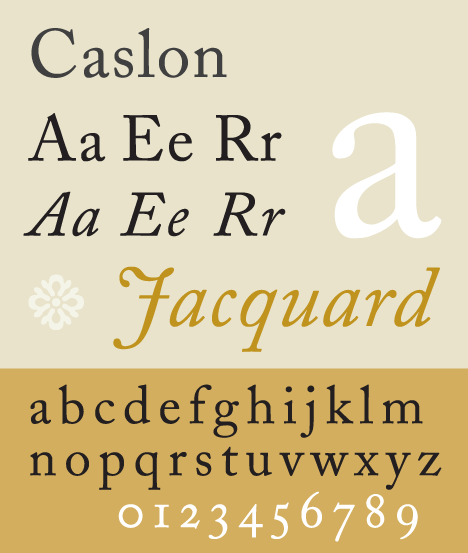
Recently, I tried Berthold Caslon Book. I was struck by its visual appeal and high legibility. Researching this family of Caslon typefaces, I learned that the Caslon typefaces have old history and good reputation.


I use OpenOffice 2.4 in Debian Linux 5.0 Lenny, but recently had a problem with exporting OpenOffice.org documents to PDF. Debian Lenny doesn't have OpenOffice.org 3.0 packages yet. I think the problem originates from using obscure Postscript fonts. I used Caslon Book BE in my OpenOffice.org Writer document, but the output of the exported PDF file was unreadable. Actually, the problematic PDF file didn't display any spaces.
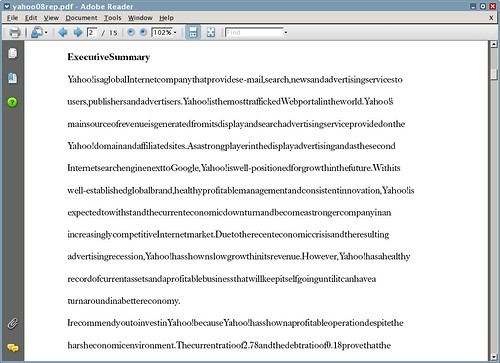
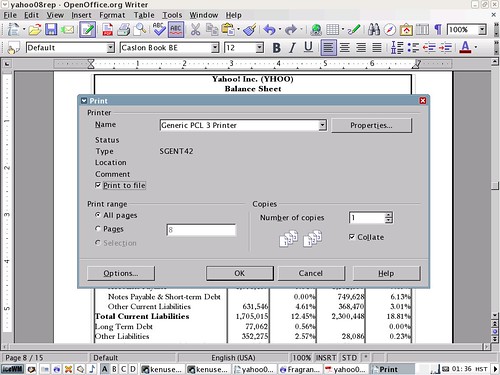
Eventually, I fixed this problem. I saved the document as a postscript printout and converted it to PDF using pstopdf13.
ps2pdf13 input.ps output.pdf
Another thing I did to fix the problem was to change Times New Roman fonts in my formulas to Times New Roman PS. I also had to convert all pictures in the document to encapsulated Postscript format and embed them in the document. For EPS conversion of the pictures, I used GIMP.
Once in a while, you come across some script that cannot be rendered on screen because you don't have the necessary font. If you are content with English only, then you can ignore this little annoyance. But if you speak another language or a foreign language student, you probably want to get a complete package of multilingual fonts.
As a Linux user, I found it sometimes frustrating or bothersome to have lack of a complete assortment of multilingual fonts. So I looked for fonts of many modern and ancient scripts on the Internet. The following is a list of fonts I collected that allow rendering of all the characters on the Web. You can use these fonts to write multilingual documents, too. A good place to test these fonts on the Web is the Wikipedia homepage.
You need the following font packages for basic rendering of Latin and Western-European alphabets. I use a Debian-based Linux system, so the following packages have Debian package names:
Additionally you need to download the following TrueType or OpenType fonts to view many foreign scripts other than English and Western European languages. Be aware that the following list is for a minimal multilingual system. There are many more fonts than listed below. You can use Yahoo! Search to find where to download these fonts. Below the contents of my /usr/local/share/fonts directory is shown.
AboriginalSansBOLD.ttf
AboriginalSansBOLDITALIC.ttf
AboriginalSansITALIC.ttf
AboriginalSansREGULAR.ttf
AboriginalSerifBOLD.ttf
AboriginalSerifBOLDITALIC.ttf
AboriginalSerifITALIC.ttf
AboriginalSerifREGULAR.ttf
Aegean.otf
FM-MalithiUW46.ttf
Phetsarath_OT.ttf
TagDoc93.ttf
akshar.ttf
arheiu30.ttf
cursor-felipe.pcf.gz
damase_v.2.ttf
dilyan.ttf
encodings.dir
estre.ttf
evermono.ttf
fonts.cache-1
fonts.dir
fonts.scale
gulim16uni.pcf.gz
h2mjsb.ttf
h2mjsm.ttf
hapaxber.ttf
hei16ascii.pcf.gz
joyig.ttf
malgun.ttf
malgunbd.ttf
micross.ttf
mm3.ttf
mond40uhgs.ttf
nastaliq_unicode.ttf
newathu.ttf
paisan98.ttf
raavi.ttf
silyi.ttf
simsun16ascii.pcf.gz
tagbanwa.ttf
tahoma.ttf
tahomabd.ttf
taileval.ttf
tashi.ttf
tituscbz.ttf
uchen.ttf
vrinda.ttf
Are you looking for free, good Korean fonts? You've come to the right place. Here I show you how to install Un fonts designed by a free Korean fonts project.
First, download the fonts from one of the links here. You may optionally choose to download additional fonts here.
Extract the fonts from the Debian package(s) with PeaZip or TugZip or any other tool.
Take the necessary steps to install the Un Korean truetype fonts in Windows.
Arial, Tahoma and Times New Roman are not displayed correctly when a CD edition of Windows Vista Home Premium is installed on your computer. To fix this problem, follow the following steps:
HKEY_LOCAL_MACHINE\SOFTWARE\Microsoft\Windows NT\CurrentVersion\FontSubstitutes.
After installing a CD edition of Windows Vista, some fonts necessary for displaying international scripts are missing from the default installation. In order to correctly display foreign characters, the following fonts need to be installed.
OpenOffice.org 3.0 installs the DejaVu and Open Symbols fonts.
To see a list of fonts installed by Microsoft Office 2007, go here.
 This blog seeks to share useful information on freely available fonts on the Internet. Thanks for visiting the blog and posting your comments.


